Back to DocsRETAIL DOCS

Retail workflows that connect the counter to the books.

Forge Control Retail is organized around the real store actions: sell, close shifts, manage stock, receive goods, run procurement, pay suppliers, reconcile tenders, review approvals, and report branch performance.

APP NAVIGATION
Home
Sell
Shift
Stock
Receive
Products
Reports
More
SCREENSHOT WORKFLOW TOUR

The retail docs are organized around the screens a merchant actually uses.

Each screenshot slot maps to a real workflow in the Retail app. The public story is not architecture; it is how a shop sells, controls cash, manages stock, clears money, reviews exceptions, and gets books-ready records from daily work.

Desktop view

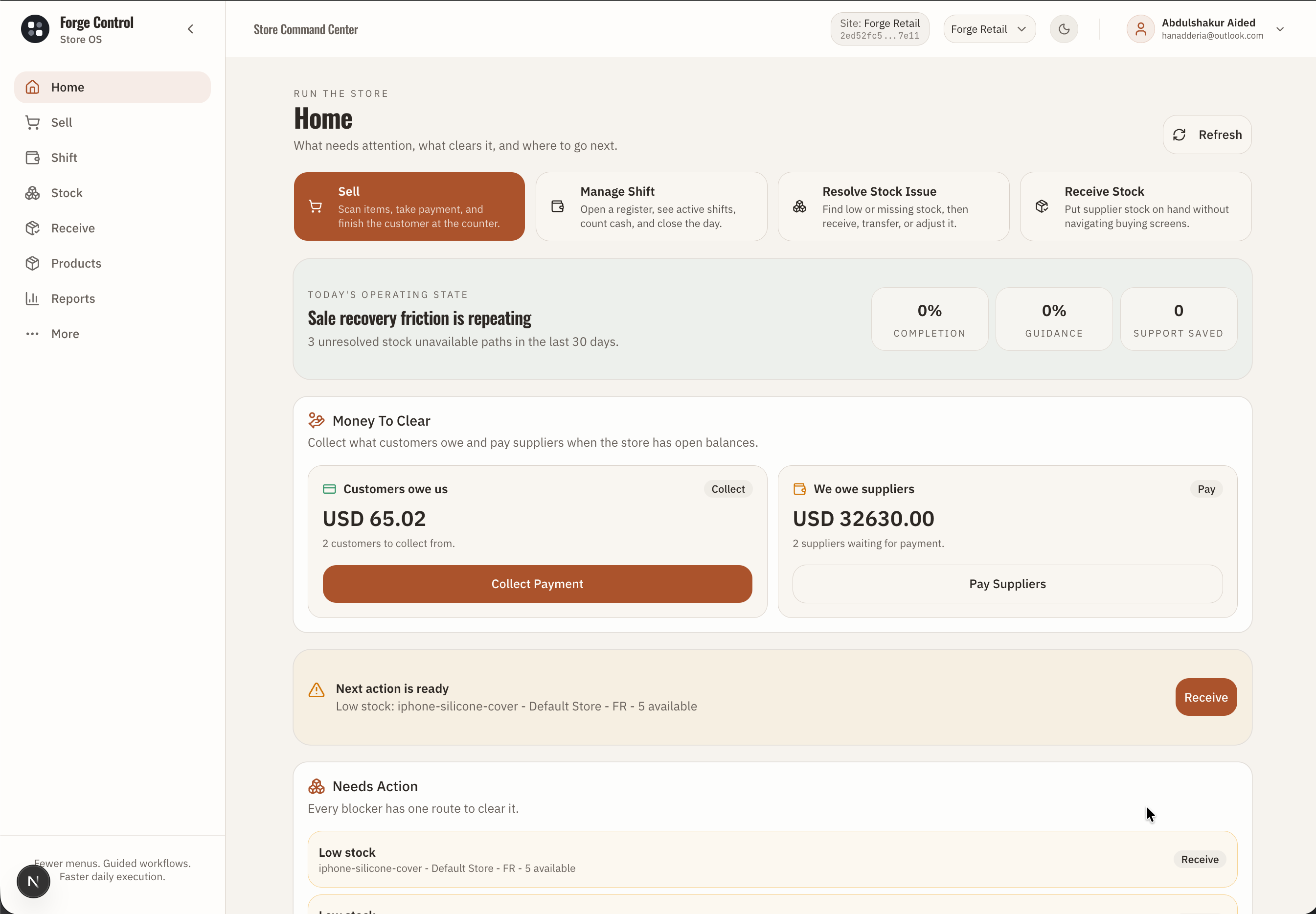
Home command center

Forge Control Retail home command center showing daily actions, money to clear, and needs action queues.
The owner or store manager starts from one operating view: what to sell, what money needs clearing, what stock needs attention, and which actions need review.

What this proves: Shows that Forge Control starts the day from operating priorities, collections, supplier obligations, stock blockers, and manager actions in one command center.

WORKFLOW 1

Home command center

/dashboard

App surface: Retail Home command center

  1. 1

    Home summarizes the store day instead of forcing staff to search across menus.

  2. 2

    Money To Clear connects customer collections and supplier payments to the daily operating state.

  3. 3

    Needs Action gives every blocker one route to clear it.

  4. 4

    This is the first screenshot because it explains the product promise: a small shop can run the day like a controlled operation.
Desktop view

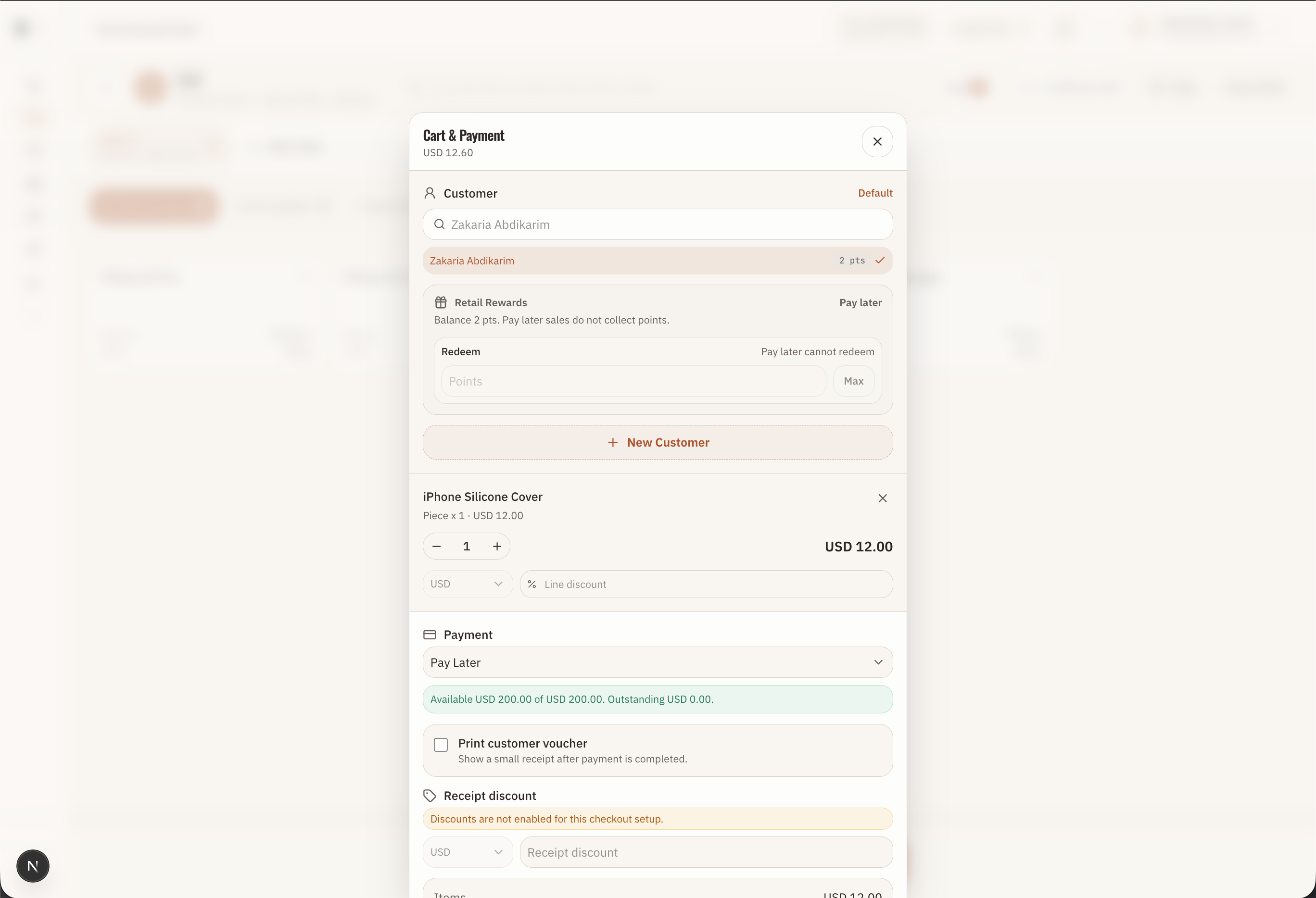
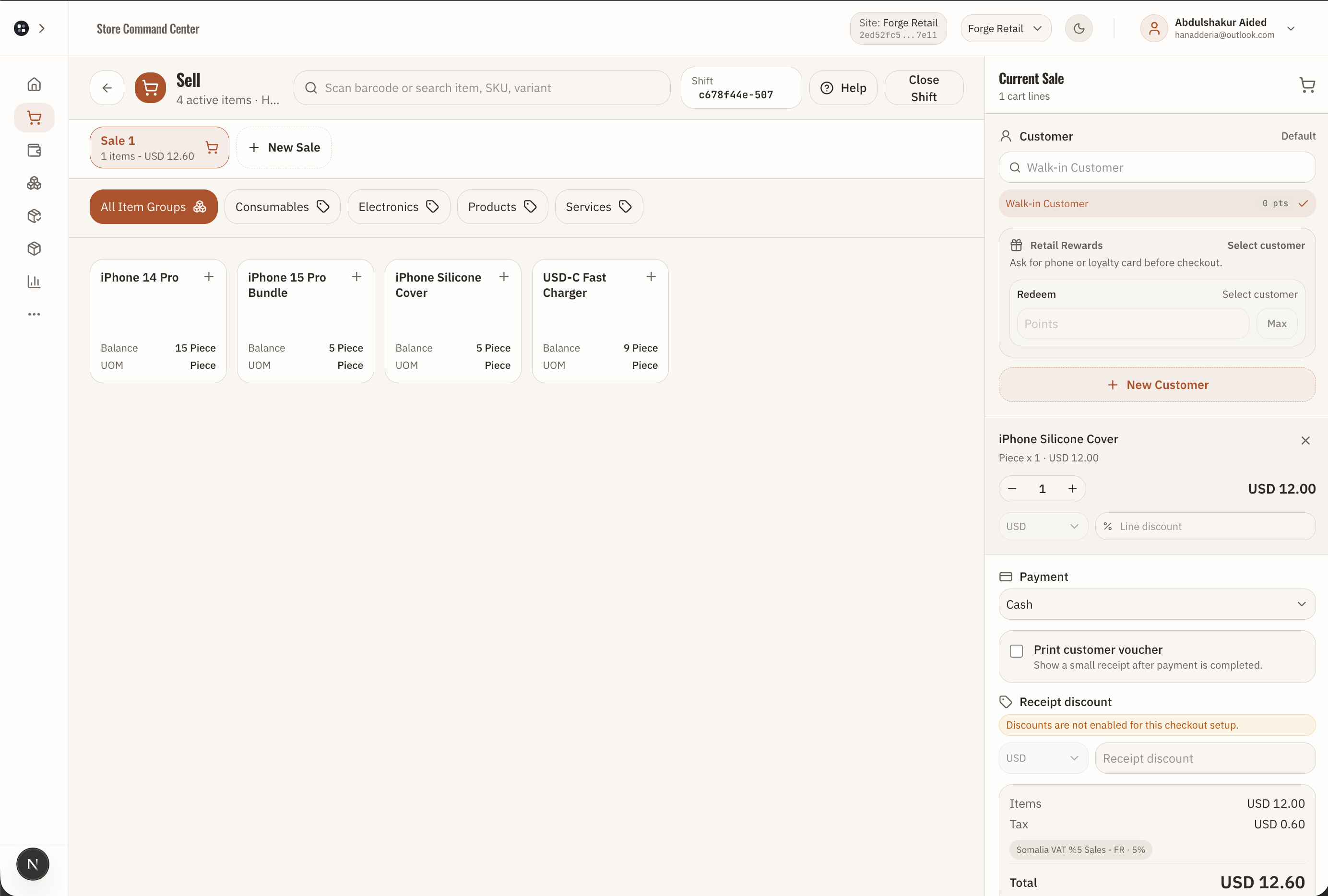
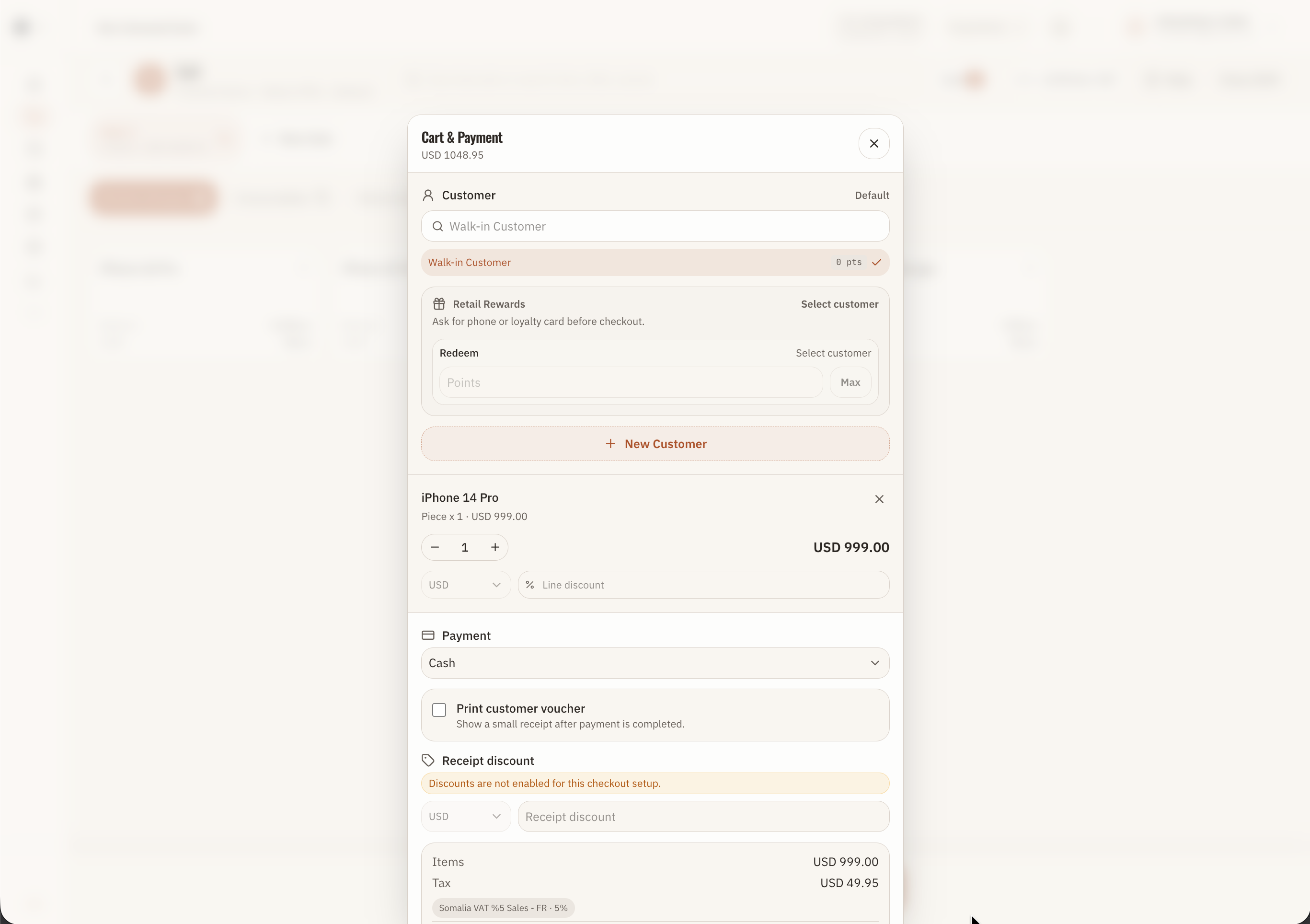
Cart and payment

Forge Control Retail POS cart and payment panel with customer, tender, totals, and checkout controls.
The POS screen proves that selling stays simple while item selection, payment method, customer context, totals, and control checks are captured in the background.

What this proves: Shows that checkout, customer context, payment method, totals, and receipt generation live inside one cashier workflow.

WORKFLOW 2

Cart and payment

/pos

App surface: Sell workspace, cart, checkout, and payment panel

  1. 1

    The cashier works inside the Sell workspace with search, cart, customer, totals, and payment options.

  2. 2

    Items, customers, pricing, discounts, taxes, loyalty, and payment method are resolved before checkout.

  3. 3

    Payment modes can represent cash, mobile wallets, bank, card, or gateway tenders.

  4. 4

    Checkout submits through submitCheckout with an idempotency key.

  5. 5

    The completed action becomes a receipt, payment record, sales ledger entry, and reportable event.

Desktop view

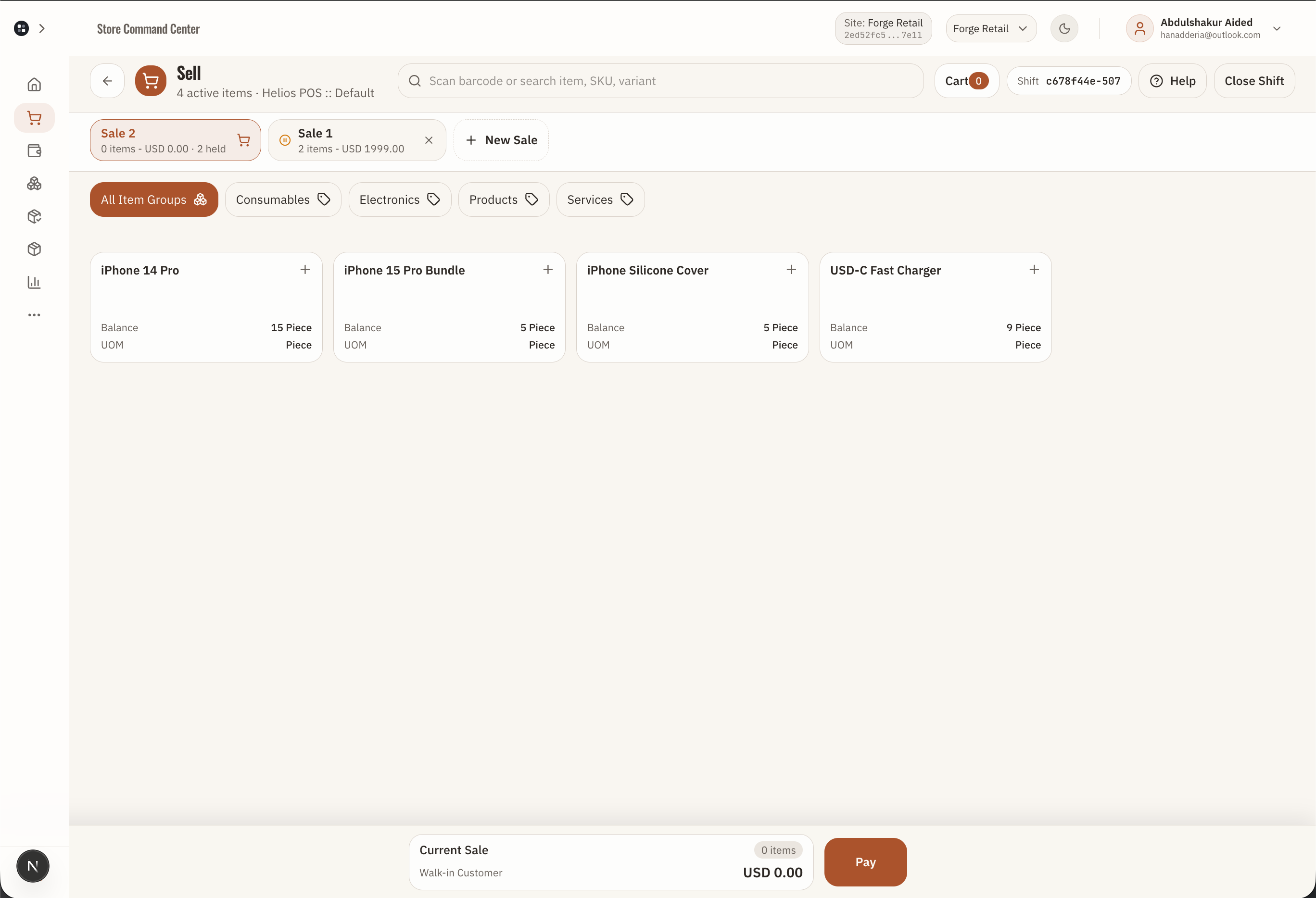
Hold, resume, and recover sales

Forge Control Retail held sales screen or POS resume flow for interrupted counter sales.
Busy counters need recovery. Held sales show that interruptions do not turn into handwritten notes or lost carts.

What this proves: Shows that interrupted sales can be held, found again, resumed, or cleared without losing the operational record.

WORKFLOW 3

Hold, resume, and recover sales

/held-sales and /pos?resume_id=...

App surface: Held sales and POS resume flow

  1. 1

    A cashier can hold a sale instead of losing the cart during interruption.

  2. 2

    Held sales are visible from Home and the Held Sales workspace.

  3. 3

    A held sale can resume into POS, then checkout or clear.

  4. 4

    This supports busy counters where staff need to pause, recover, and continue without rewriting the order.

Desktop view

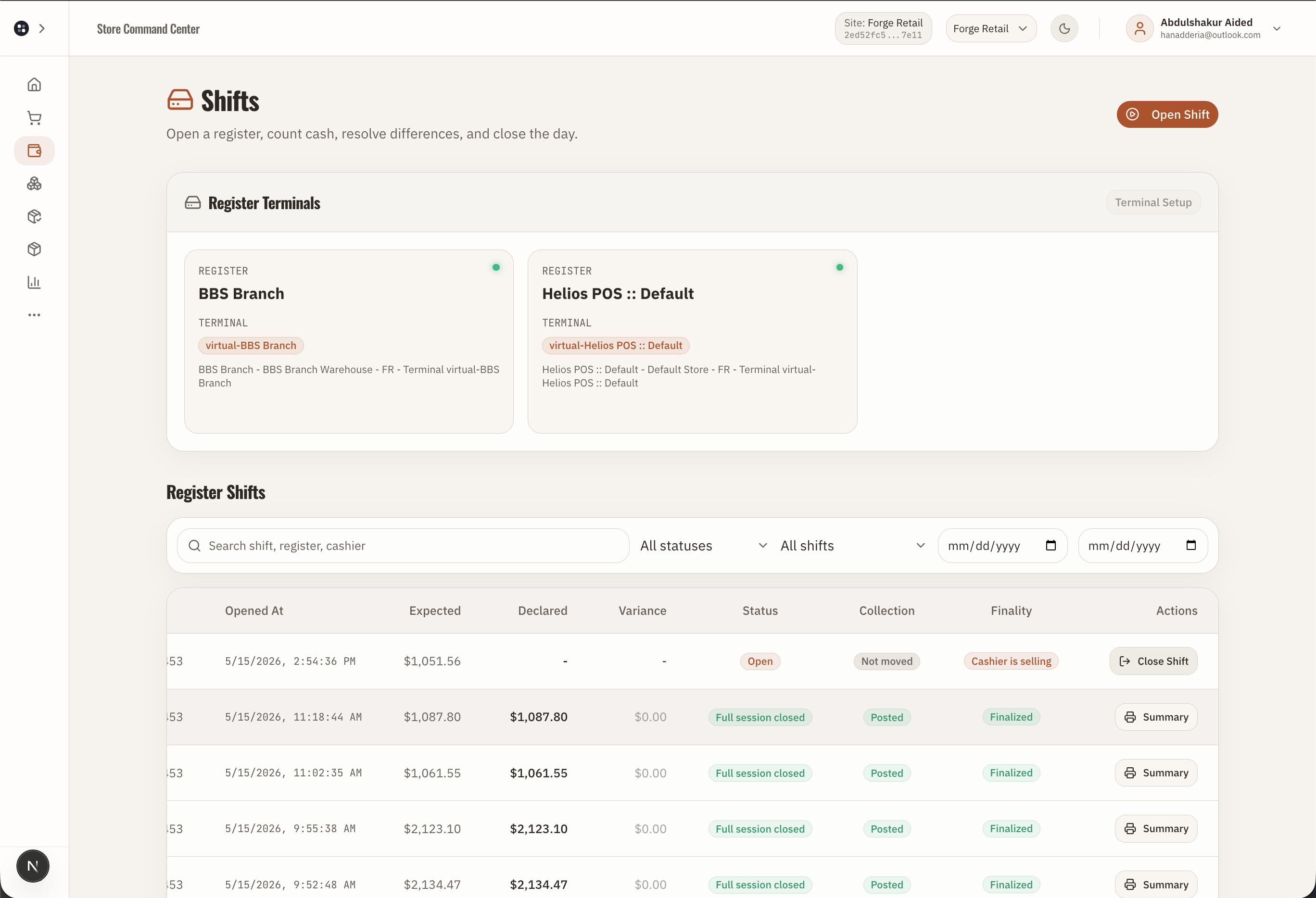
Open and close shift

Forge Control Retail shift and register session screen for opening, closing, and counting cash.
Shifts turn cashier activity into a controlled register session with starting cash, tender totals, closing counts, and variance review.

What this proves: Shows that cashier work is tied to register sessions, opening cash, closing counts, expected tenders, and variance review.

WORKFLOW 4

Open and close shift

/registers and /pos/close

App surface: Shift, register session, and closing count

  1. 1

    A cashier session opens against a register lane or POS profile with a cash float.

  2. 2

    Sales and tender activity accumulate during the session.

  3. 3

    At close, declared amounts are compared with expected tender totals.

  4. 4

    Variance and cash movement states become reviewable records instead of informal end-of-day notes.

Desktop view

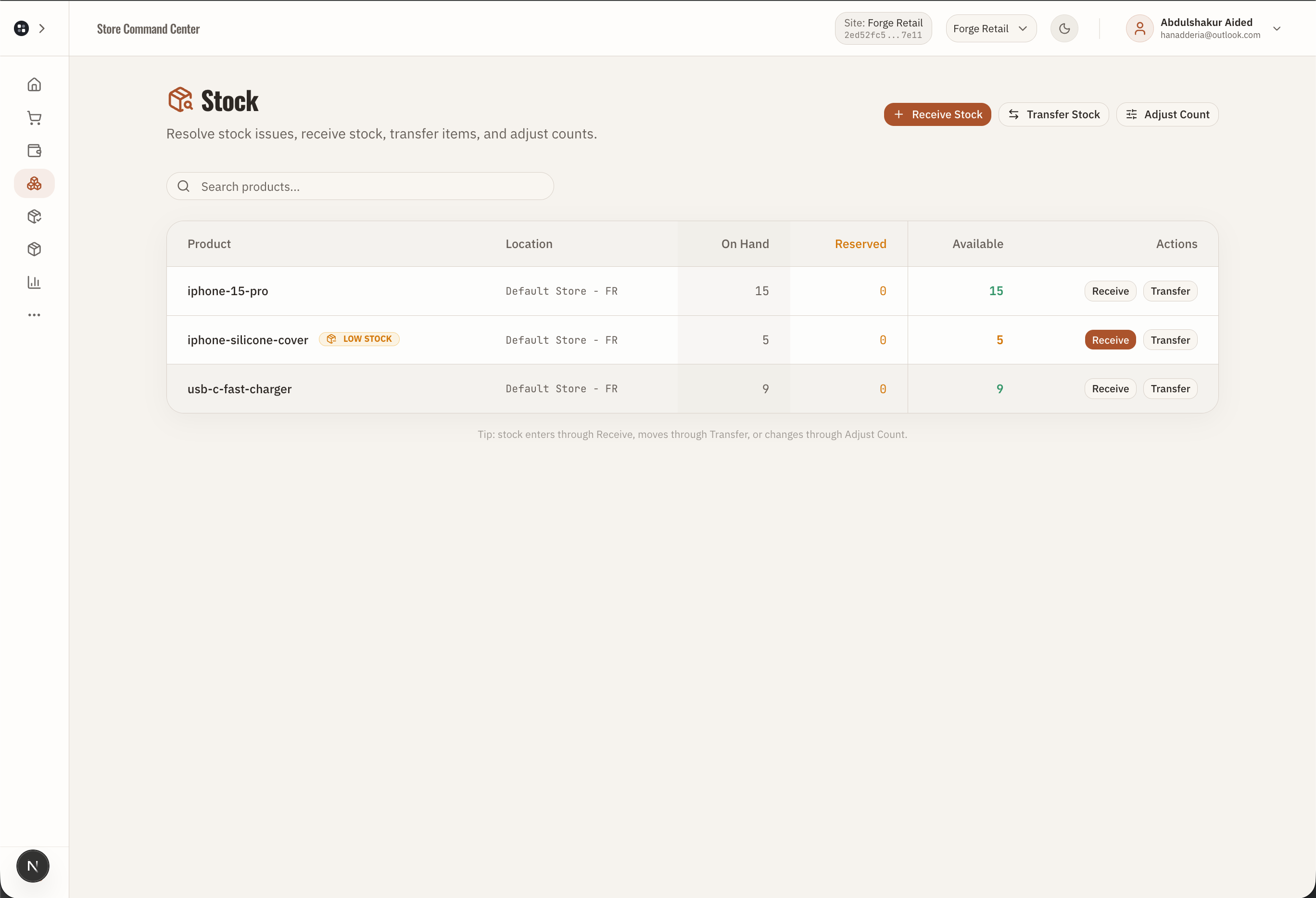
Stock overview

Forge Control Retail stock overview showing item balances, low stock, and stock actions.
Stock is presented as an operating queue: what is available, what is low, and what action clears the issue.

What this proves: Shows that stock balances, low-stock signals, warehouses, and stock actions are visible as operating work, not hidden inventory tables.

WORKFLOW 5

Stock overview

/stock

App surface: Stock balances, low stock, and stock actions

  1. 1

    Staff check item balances without needing inventory theory.

  2. 2

    Low stock and unavailable stock paths point to receive, transfer, or adjust actions.

  3. 3

    Stock work remains tied to branch, warehouse, product, and operation status.

  4. 4

    Owners get traceability without asking cashiers to understand inventory accounting.

Desktop view

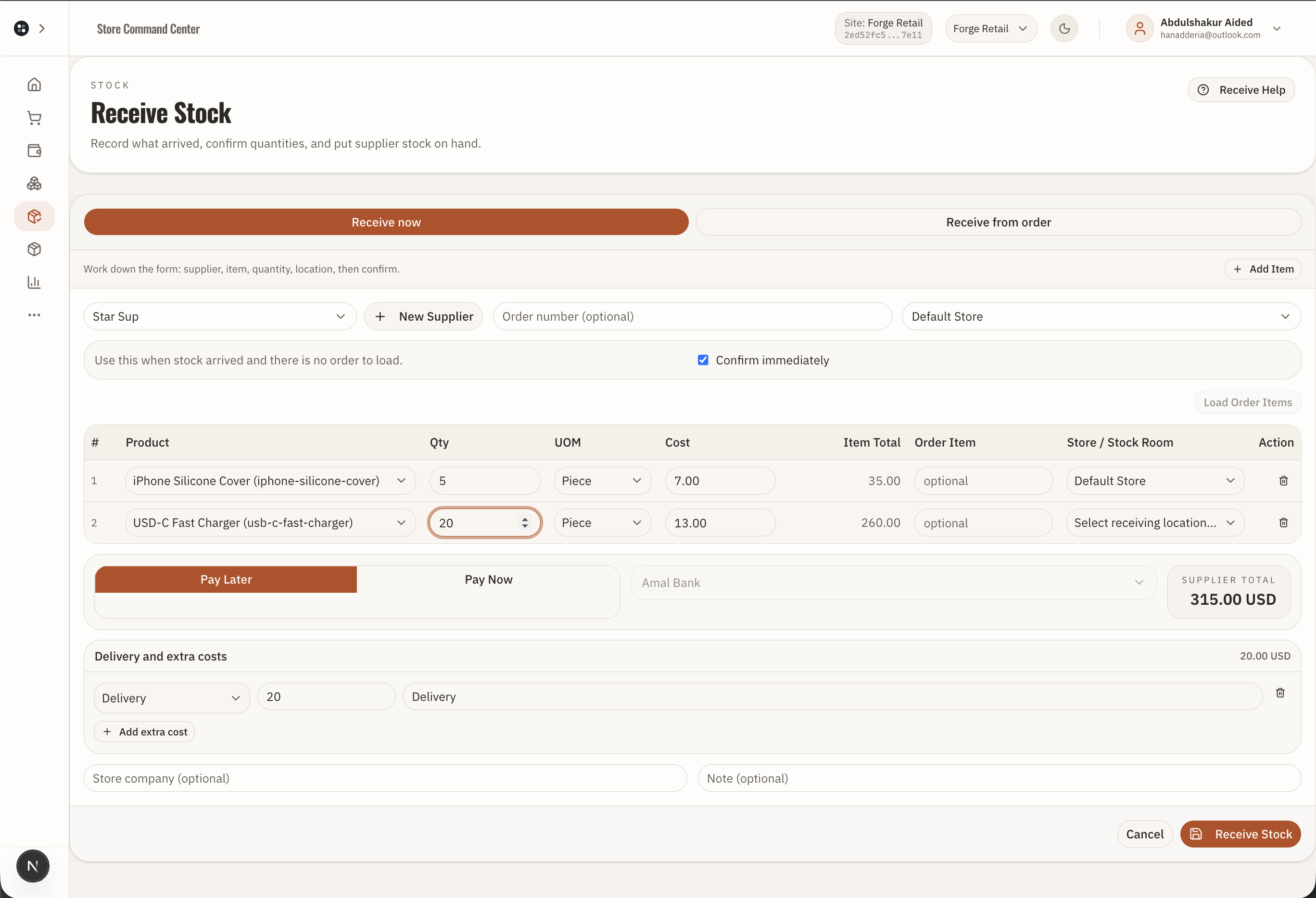
Receive stock

Forge Control Retail receive stock workflow for putting supplier goods on hand.
Receiving should feel like a floor task: select the item, supplier or stock room context, quantity, and submit. The control record follows the workflow.

What this proves: Shows that receiving supplier stock creates a traceable stock workflow connected to item, quantity, branch or warehouse context, and review state.

WORKFLOW 6

Receive stock

/stock, /stock/add, /procurement/inventory-receipts

App surface: Receive stock and inventory receipt workflow

  1. 1

    Staff check stock, receive inventory, adjust stock, or transfer goods through guided screens.

  2. 2

    Inventory receipt requests are saved as operations and can enter approval or pending execution states.

  3. 3

    Transfers and receipts connect stock movement to branch, warehouse, supplier, and accounting context.

  4. 4

    The owner sees inventory work as traceable activity instead of scattered manual edits.

Mobile view

Products and branch setup

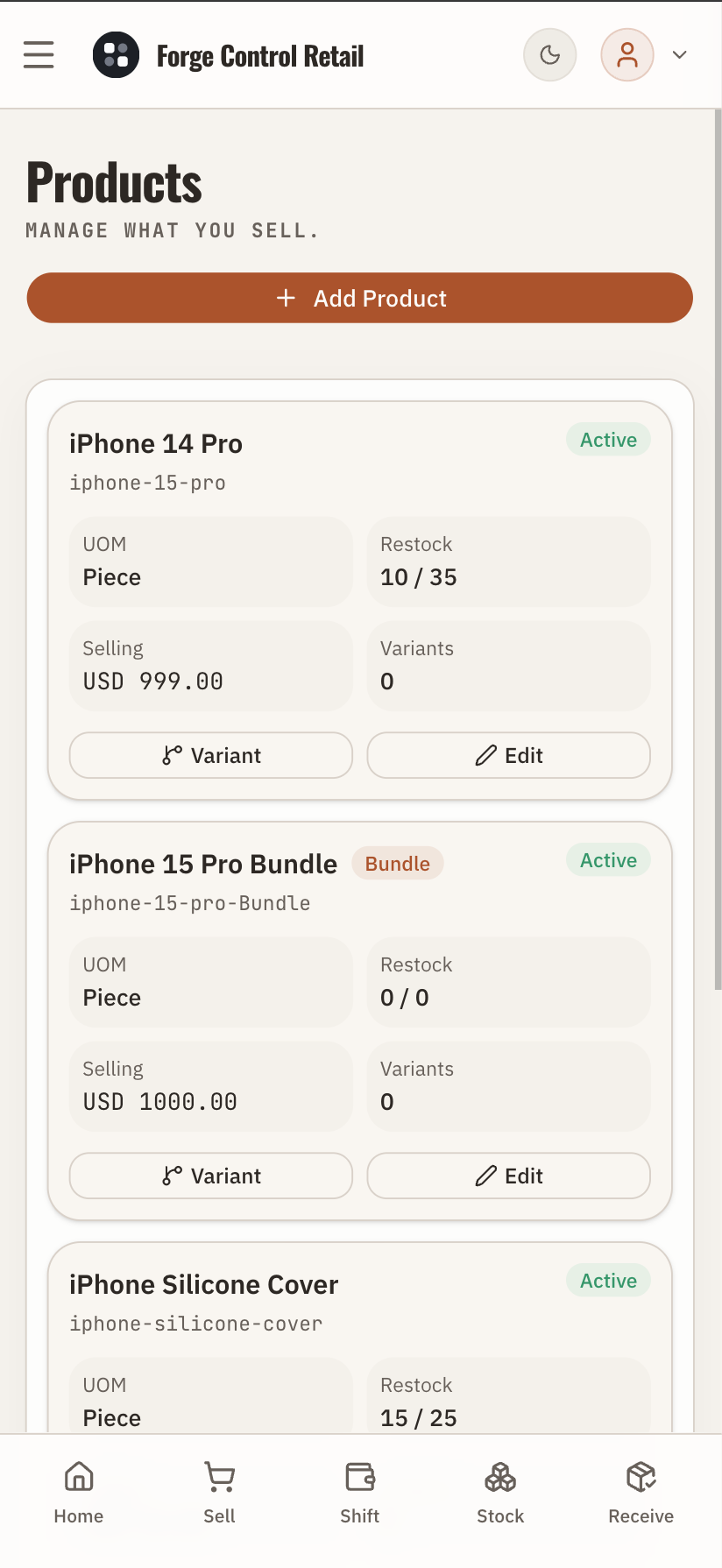
Forge Control Retail product catalog mobile screen showing retail items available for store operations.
Product setup is part of the operating foundation: items are created once, then cashiers sell from a simpler daily workspace.

What this proves: Shows that product data is managed separately from checkout so prices, variants, groups, stock, and reports can stay consistent.

WORKFLOW 7

Products and branch setup

/procurement, /purchase-orders, /purchase-receipts, /pay-suppliers

App surface: Products and catalog setup

  1. 1

    Products, variants, item groups, and prices are configured outside the checkout rush.

  2. 2

    Cashiers do not need to understand catalog administration during a sale.

  3. 3

    Product data feeds POS, stock, receiving, reports, and branch operations.

  4. 4

    This keeps the sales workflow simple while the business keeps clean operating data.

Desktop view

Navigation and operating boundary

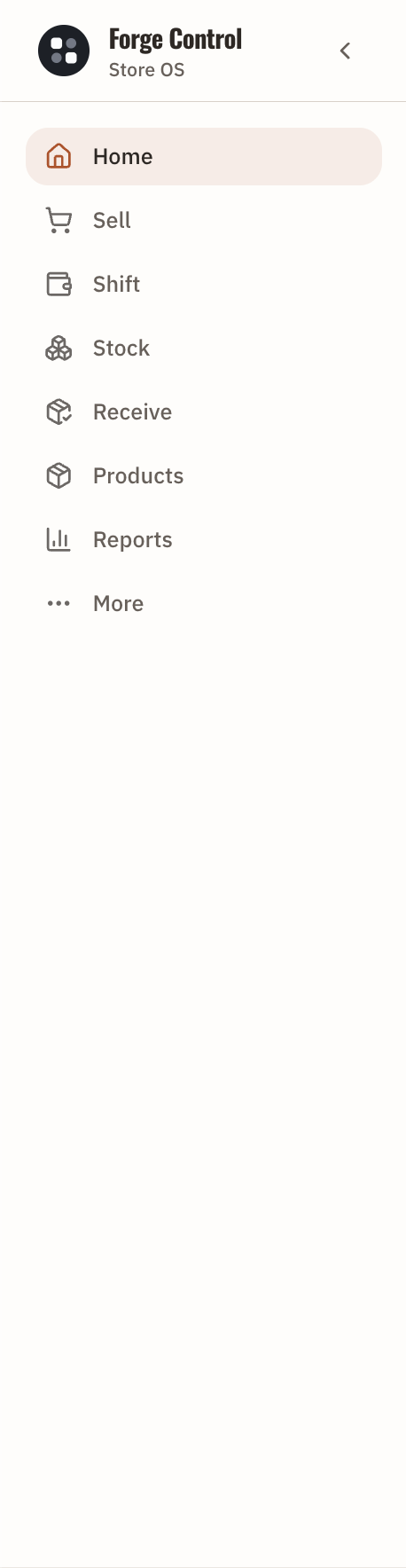
Forge Control Retail navigation showing the main daily workflows and support paths.
Navigation is part of the product design: daily work is easy to find, while deeper support and accounting paths stay outside the cashier's main flow.

What this proves: Shows that the app separates common floor workflows from support, manager, and accounting paths across desktop and mobile navigation.

WORKFLOW 8

Navigation and operating boundary

Desktop sidebar and mobile bottom navigation

App surface: Desktop sidebar and mobile navigation

  1. 1

    Home, Sell, Shift, Stock, Receive, Products, Reports, and More form the desktop operating map.

  2. 2

    Mobile keeps the most common floor actions close: Home, Sell, Shift, Stock, and Receive.

  3. 3

    The More area carries manager review, customers, suppliers, fund transfers, accounting, and setup.

  4. 4

    This helps merchants and AI reviewers understand the boundary: simple daily work first, deeper controls available when needed.

Mobile view

Branch setup and operating configuration

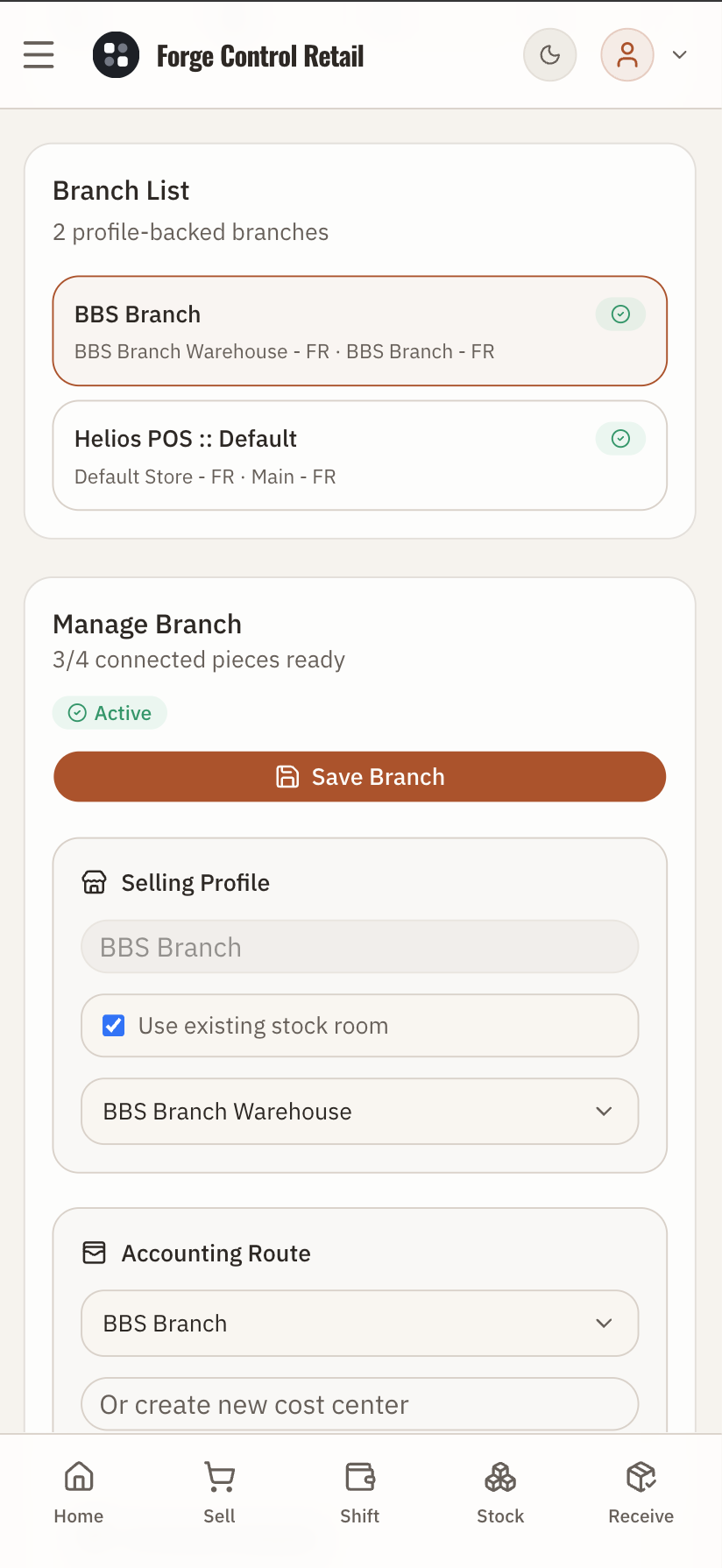
Forge Control Retail branch setup mobile screen showing branch-level operating configuration.
Branch setup supports multi-location control without making every cashier think about branches, stock rooms, register mapping, or permissions.

What this proves: Shows that multi-branch configuration exists for sites, stock rooms, register mapping, and cashier access before daily users start work.

WORKFLOW 9

Branch setup and operating configuration

/settings/branches

App surface: Branch setup and operating configuration

  1. 1

    Branch profiles, stock rooms, cashier access, and register mapping support multi-location control.

  2. 2

    Setup is handled by managers or implementers, then daily workers operate through simple workflows.

  3. 3

    The active site keeps sales, stock, shifts, receiving, and reports tied to the right location.

  4. 4

    This is how a small company can expand without losing branch-level discipline.

Desktop view

Operations and approvals

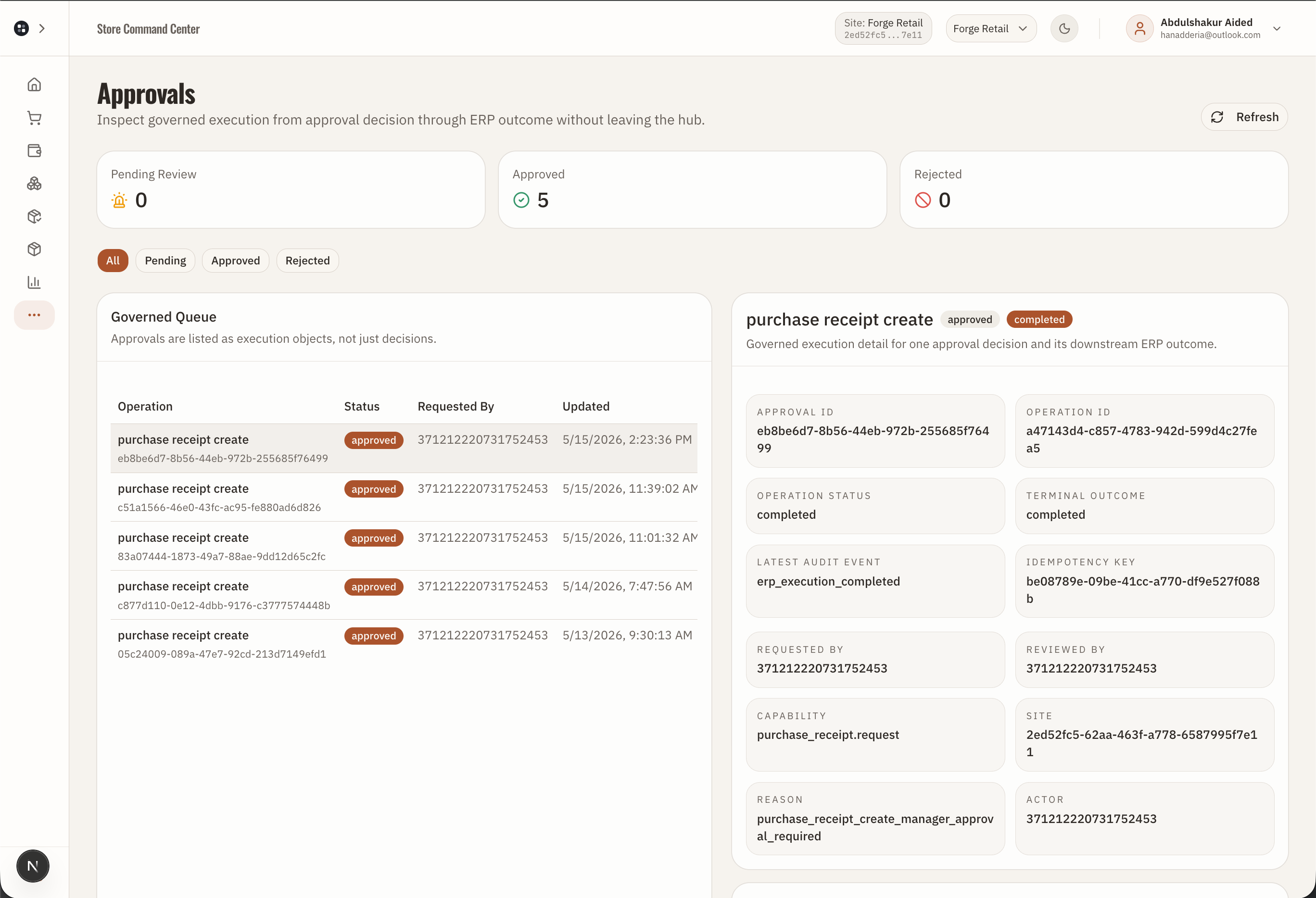
Forge Control Retail operations or approvals queue showing action status, review, retry, rejection, and completion states.
Operations and approvals are the maker-checker layer: sensitive or failed work becomes reviewable instead of disappearing into a spreadsheet or chat message.

What this proves: Shows that governed work has review, approval, retry, rejection, completion, and exception states instead of informal after-the-fact control.

WORKFLOW 10

Operations and approvals

/operations, /approvals, /exceptions, /reconciliation

App surface: Operations, approvals, exceptions, and reconciliation

  1. 1

    Operation tracking records local queue, pending submission, pending central execution, pending approval, accepted, approved, rejected, and failed states.

  2. 2

    Managers can review held sales, stock changes, checkout actions, shift actions, or exceptions.

  3. 3

    Reconciliation gives the store a formal day-check instead of informal closing notes.

  4. 4

    This is the evidence for enterprise-grade control in a small-business workflow.

Desktop view

Customer credit and loyalty

Forge Control Retail customer, pay later, or loyalty screen showing balances and collections.
Customer balances and loyalty become operational workflows: sell now, collect later when allowed, and keep the customer record connected to the sale.

What this proves: Shows that customer credit, pay-later collection, and loyalty are connected to POS activity and customer records.

WORKFLOW 11

Customer credit and loyalty

/customers, /pay-later, /loyalty

App surface: Customers, Pay Later, and loyalty

  1. 1

    Customer records and customer groups support credit, loyalty, and repeat-sale history.

  2. 2

    Pay Later depends on a selected customer, allowed status, and available limit.

  3. 3

    Open customer balances can be collected later through the Pay Later workflow.

  4. 4

    Loyalty points and redemption appear in the POS and customer surfaces when configured.

Desktop view

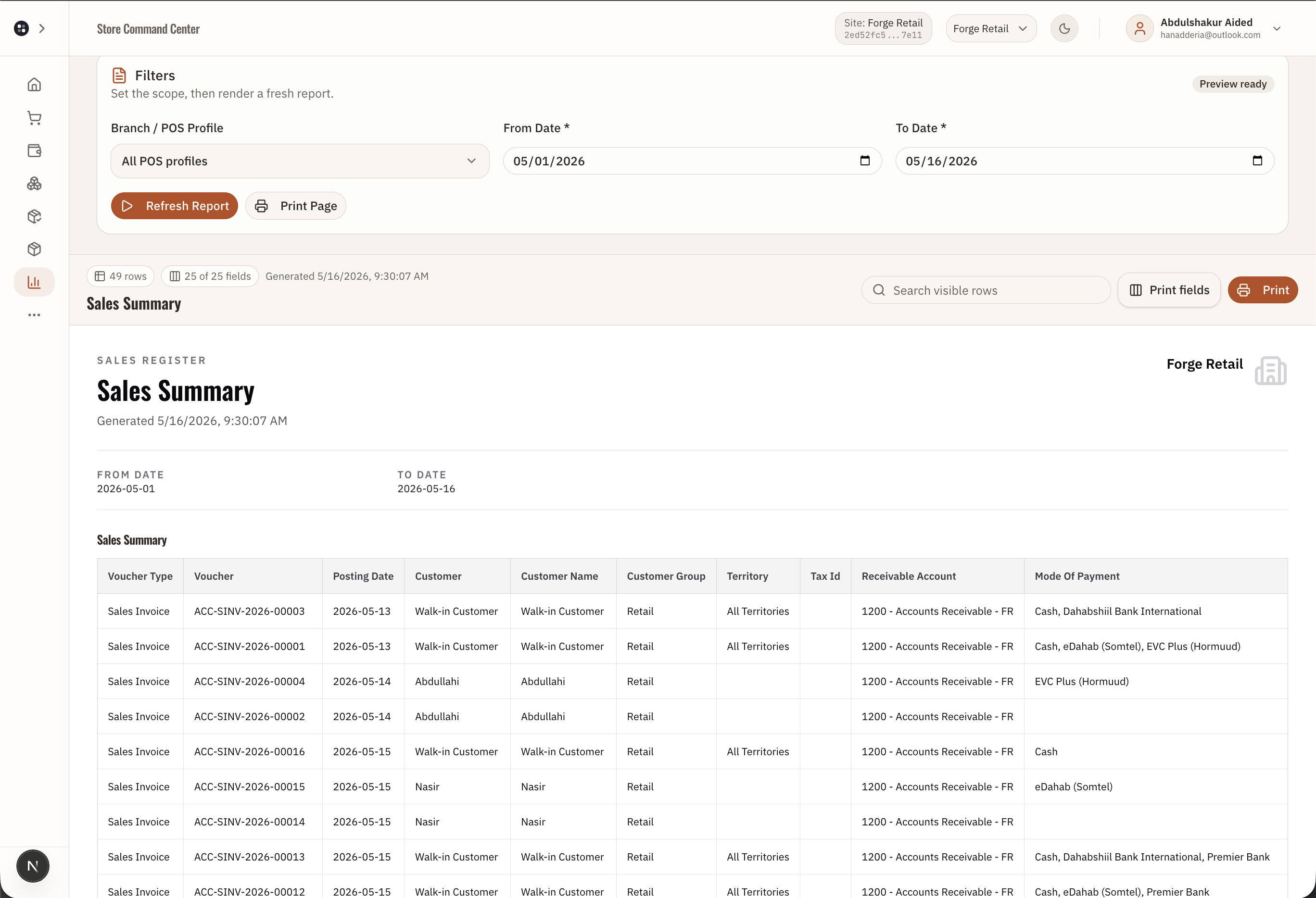
Sales summary

Forge Control Retail sales summary showing store performance, totals, and reviewable daily sales figures.
The sales summary turns the store day into a management view: totals, trends, and performance signals without rebuilding a spreadsheet.

What this proves: Shows that sales totals and performance signals are produced from store activity and available for owner review on desktop and mobile.

WORKFLOW 12

Sales summary

/sales/summary

App surface: Sales summary and daily review

  1. 1

    Managers can understand how the store is performing from a summary surface.

  2. 2

    Daily sales totals stay connected to the underlying sales records.

  3. 3

    Mobile views let owners review the business away from the counter.

  4. 4

    This is part of the larger promise: the merchant runs workflows, and the system produces clarity.

Desktop view

Sales ledger and refunds

Forge Control Retail sales ledger showing receipts, filters, payment method, cashier, shift, and refund context.
The sales ledger proves that counter activity becomes searchable records: receipt detail, payment method, cashier, shift, customer, and refund context.

What this proves: Shows that completed sales become searchable ledger records tied to receipts, cashiers, shifts, tenders, customers, and refunds.

WORKFLOW 13

Sales ledger and refunds

/sales

App surface: Sales ledger, receipt detail, and refunds

  1. 1

    Managers filter sales by receipt, date, register, session, cashier, payment method, and status.

  2. 2

    Receipt detail gives the source record for review.

  3. 3

    Refunds are submitted against the original sale context with returned lines and payment links.

  4. 4

    Refund operations can complete, queue, replay, reject, or require approval depending on control state.

Desktop view

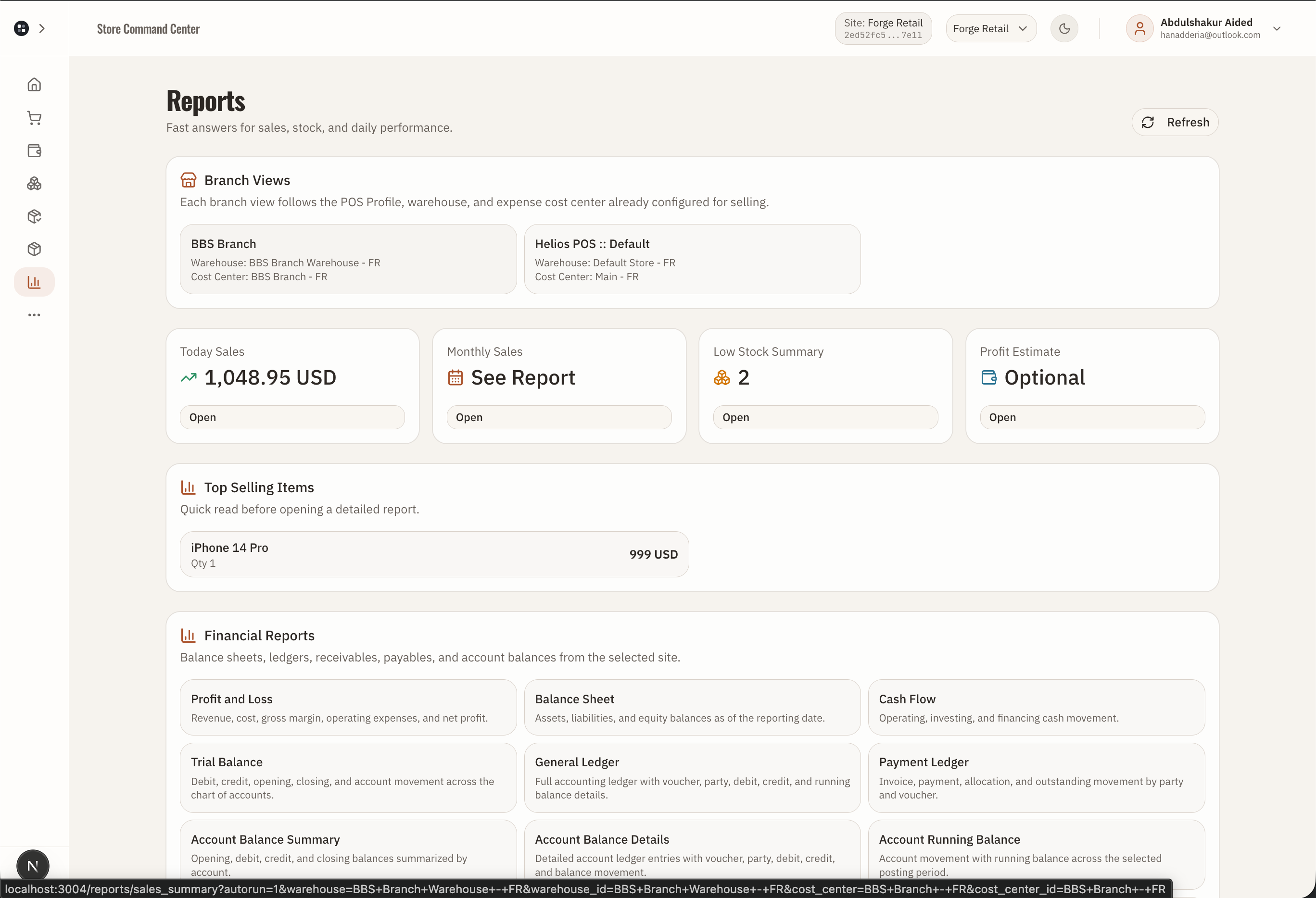
Reconciliation and reports

Forge Control Retail reports or reconciliation page showing operational reports and day review.
Reports make the operation legible: sales, sessions, payment modes, stock movement, supplier activity, and reconciliation can be reviewed without rebuilding spreadsheets.

What this proves: Shows that reports and reconciliation are generated from operating workflows so owners can review the business without manual spreadsheet reconstruction.

WORKFLOW 14

Reconciliation and reports

/reconciliation and /reports

App surface: Reports and day reconciliation

  1. 1

    Sales, sessions, payment modes, stock movement, and operations feed reviewable reports.

  2. 2

    Reconciliation checks compare expected records against actual operational state.

  3. 3

    Report jobs and print documents make management views repeatable.

  4. 4

    Owners can review what happened without asking staff to rebuild spreadsheets.

CONTROL LAYER

The cashier sees the workflow. The owner gets the control.

The retail app keeps daily work focused while operation status, approvals, reconciliation, reports, and accounting records form around the completed actions.

Site scope keeps the active branch or operating site clear.
Payment modes can represent cash, mobile wallets, bank, card, or gateway tenders.
Operation tracking records local queue, pending submission, pending central execution, pending approval, accepted, approved, rejected, and failed states.
Approvals and exceptions live under More so managers can review sensitive activity.
CONNECTION MAPS

The important retail workflows connect end to end.

These are the public workflow connections visible from the Retail app route structure, page behavior, and API workflow names.

POS -> active cashier session -> checkout -> sales ledger -> receipt detail -> refund or operation review when needed.
POS Pay Later -> customer credit balance -> Pay Later collection -> payment operation and accounting record.
Low stock or checkout stock guard -> Stock -> Receive, Transfer, or Adjust Count -> inventory operation -> approval/review when governed.
Shift open -> POS selling -> shift close tender declaration -> cash or tender movement -> variance review -> reconciliation.
Purchase order -> purchase receipt -> stock on hand. Purchase order pages link directly toward receiving stock.
Supplier receipt or payable -> Pay Suppliers -> supplier payment operation and accounting context.
DOCUMENTATION NOTES

What we can safely say publicly.

Public docs should say submitted, reviewed, completed, or reconciled rather than promise immediate ERP posting for every governed action.

The UI exposes accounting setup, accounts, payments, fund transfers, and reconciliation; exact journal mechanics belong to backend/accounting implementation details.

Local POS held tabs and server-held sales are different recovery layers. The public explanation should keep them simple: hold, resume, checkout, or clear.