Back to DocsPROPERTY DOCS

Property workflows that connect tenants, rent, maintenance, and books.

Forge Control Property is organized around the real property work: portfolio setup, tenants, leases, rent, payments, maintenance, expenses, daily review, reports, and owner-ready cash clarity.

APP NAVIGATION
Home
Portfolio
Tenants
Rent
Maintenance
Reports
Settings
SCREENSHOT WORKFLOW TOUR

The property docs are organized around screens a property team actually uses.

Each screenshot is connected to a property workflow and a proof statement. The public story is how a small property company manages units, tenants, rent, maintenance, cashflow, and owner review without exposing every accounting detail to daily users.

Desktop view

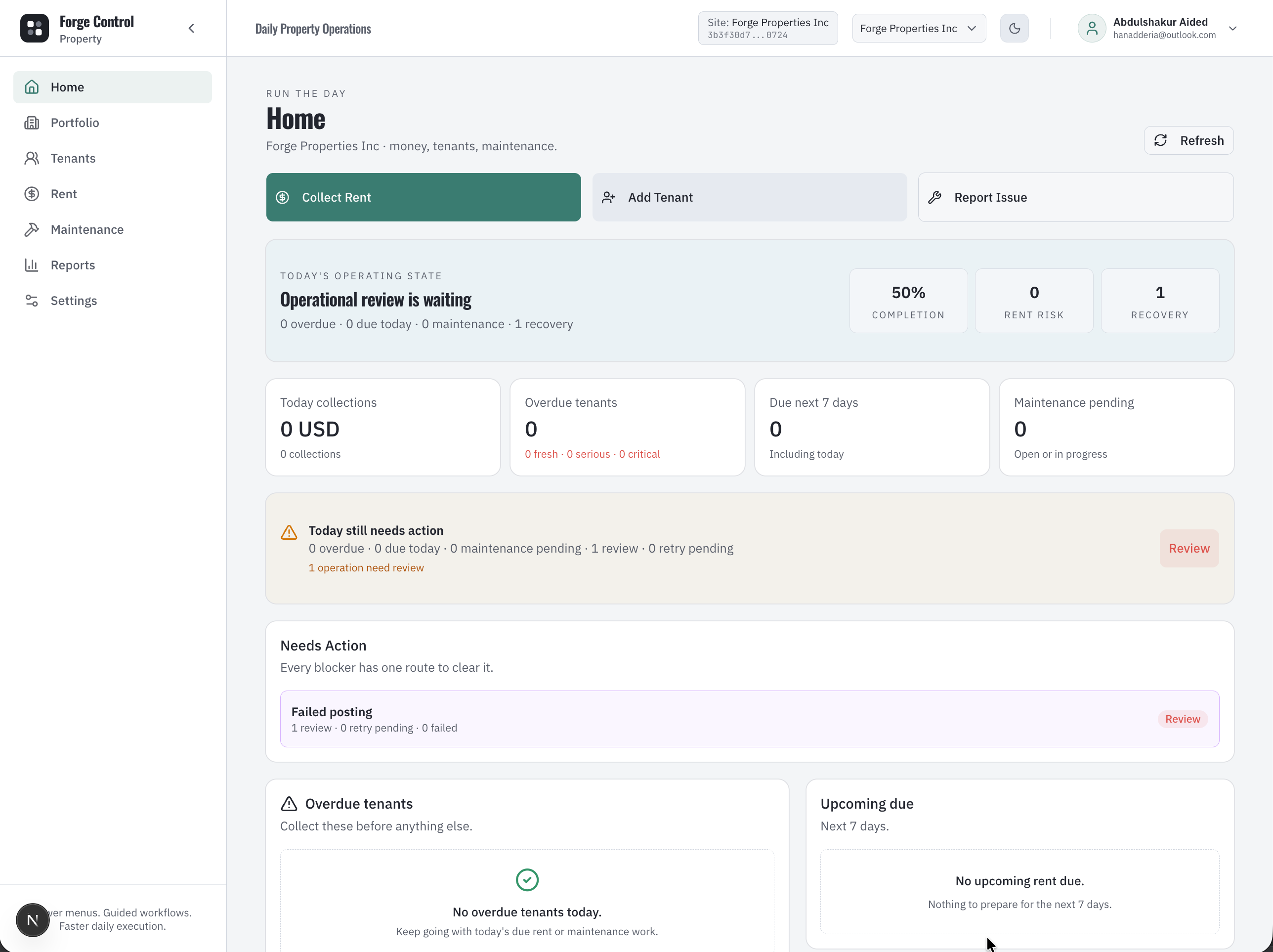
Property command center

Forge Control Property home command center showing rent, maintenance, move-in blockers, and portfolio work.
The property operator starts from one view of what needs attention: rent, maintenance, move-ins, documents, and owner review.

What this proves: Shows that property work starts from operating priorities instead of scattered tenant sheets, rent notes, and maintenance messages.

WORKFLOW 1

Property command center

/dashboard

App surface: Property Home command center

  1. 1

    Home highlights overdue rent, upcoming rent, pending maintenance, move-in blockers, and work needing review.

  2. 2

    The operator can move from a blocker to the correct workflow without hunting through reports.

  3. 3

    Mobile keeps the same daily operating state available away from the desk.

  4. 4

    This is the first proof that a small property business can run from a controlled daily command center.
Mobile view

Daily actions on mobile

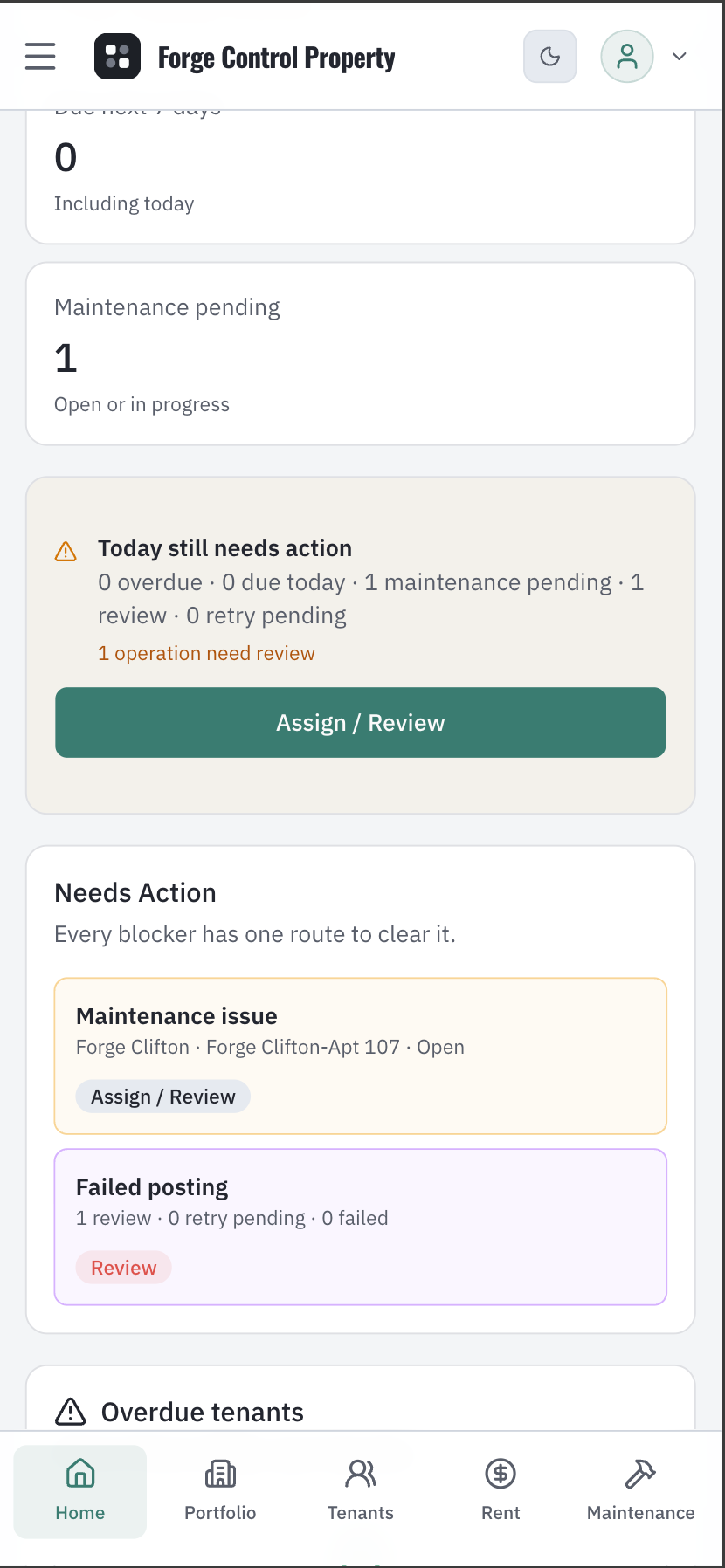
Forge Control Property mobile home actions for daily property work.
Mobile actions keep the most common work close to the field user: collect, inspect, report, review, and follow up.

What this proves: Shows that the product is designed for property teams who move between tenants, units, offices, and maintenance sites.

WORKFLOW 2

Daily actions on mobile

/dashboard

App surface: Mobile Home actions

  1. 1

    Field users can start common property actions without opening a desktop screen.

  2. 2

    Daily work stays task-based instead of module-heavy.

  3. 3

    The mobile flow supports quick action while preserving operational context.

  4. 4

    This is how new staff can follow the workflow without learning property accounting first.

Desktop view

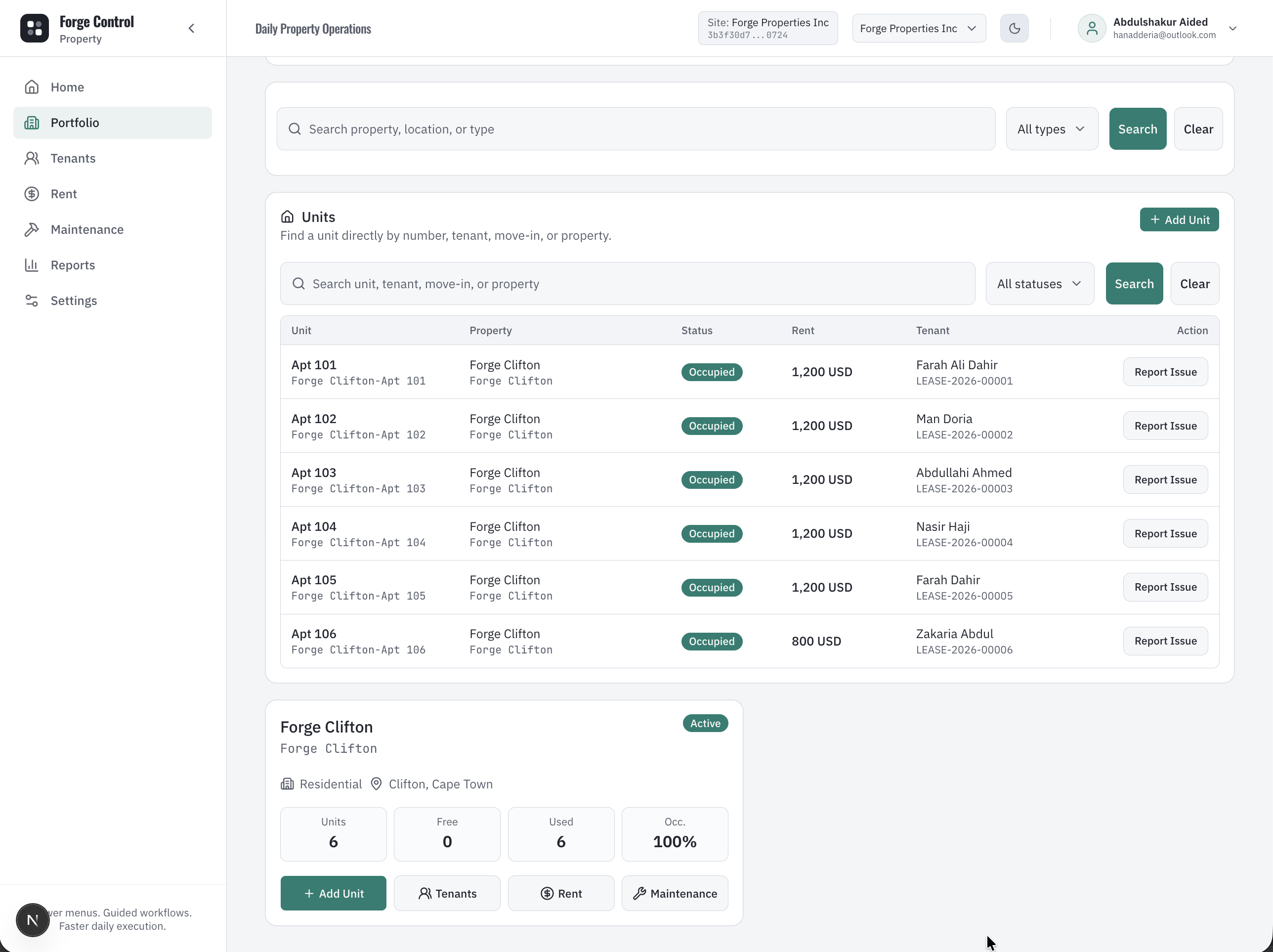
Portfolio and units

Forge Control Property portfolio showing properties, units, occupancy, and portfolio structure.
The portfolio screen gives the owner a practical map of properties and units before tenants, rent, and maintenance begin.

What this proves: Shows that properties, units, occupancy, and site scope are structured inside the system rather than kept in disconnected spreadsheets.

WORKFLOW 3

Portfolio and units

/properties and /property/[propertyId]

App surface: Portfolio and unit setup

  1. 1

    Create the property or operating site.

  2. 2

    Add units with rent price, unit type, floor, and area where relevant.

  3. 3

    Track occupied, available, reserved, and maintenance unit state.

  4. 4

    Use site scope so teams know which portfolio or operating site they are working in.

Desktop view

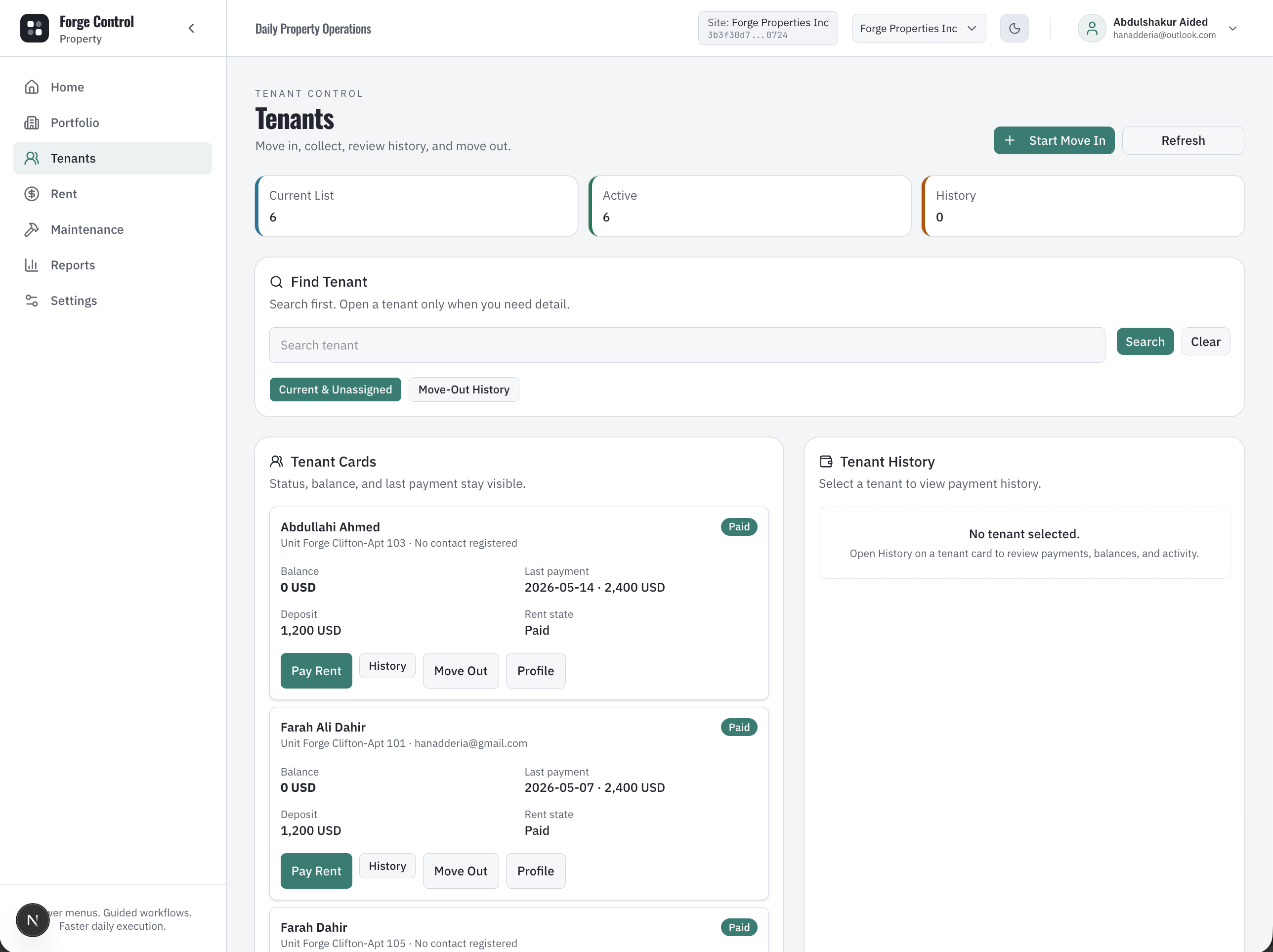
Tenants directory

Forge Control Property tenants directory showing tenant records and rent context.
Tenants are not just contacts. They are linked to leases, balances, move-in history, documents, and collection work.

What this proves: Shows that tenant records are operational records connected to rent, leases, units, and follow-up activity.

WORKFLOW 4

Tenants directory

/tenants

App surface: Tenants directory

  1. 1

    Find tenants by name, lease status, property, balance, or follow-up context.

  2. 2

    Keep tenant records connected to the property and unit they occupy.

  3. 3

    Support rent collection and service follow-up from the tenant surface.

  4. 4

    Give managers a single place to understand tenant state before acting.

Desktop view

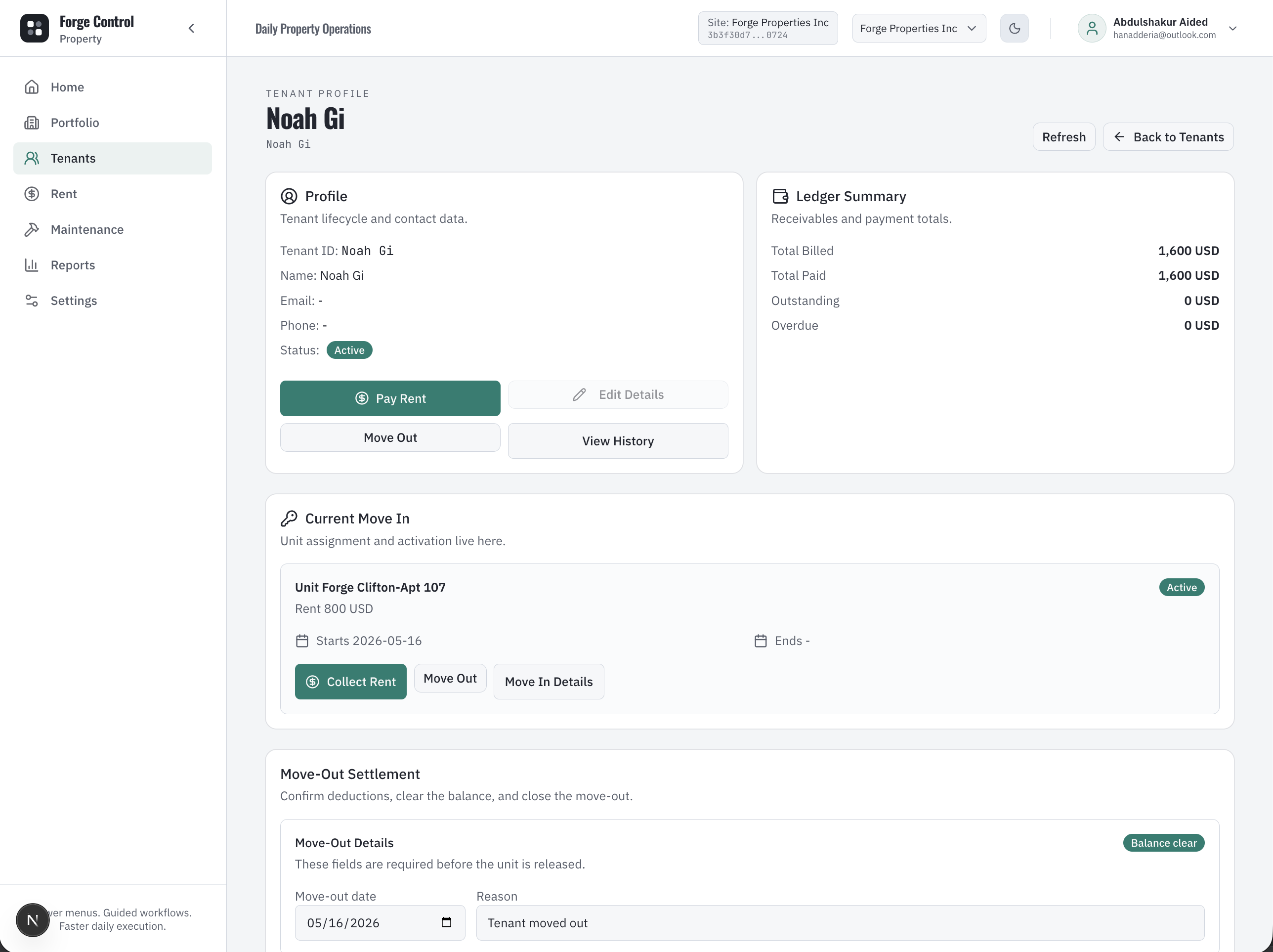
Tenant profile

Forge Control Property tenant profile showing lease, balance, rent state, and tenant actions.
The tenant profile pulls together the practical story: who lives there, what lease applies, what is owed, and what action comes next.

What this proves: Shows that tenant service, rent state, lease context, and financial balance can be reviewed from one tenant workspace.

WORKFLOW 5

Tenant profile

/tenants/[tenantId]

App surface: Tenant profile

  1. 1

    Tenant profile shows current lease, history, balance, deposit, rent state, and action links.

  2. 2

    Managers can review tenant state before collecting rent, moving out, or resolving a dispute.

  3. 3

    Tenant context stays tied to property, unit, ledger, and documents.

  4. 4

    This reduces the need to ask staff to reconstruct tenant history manually.

Desktop view

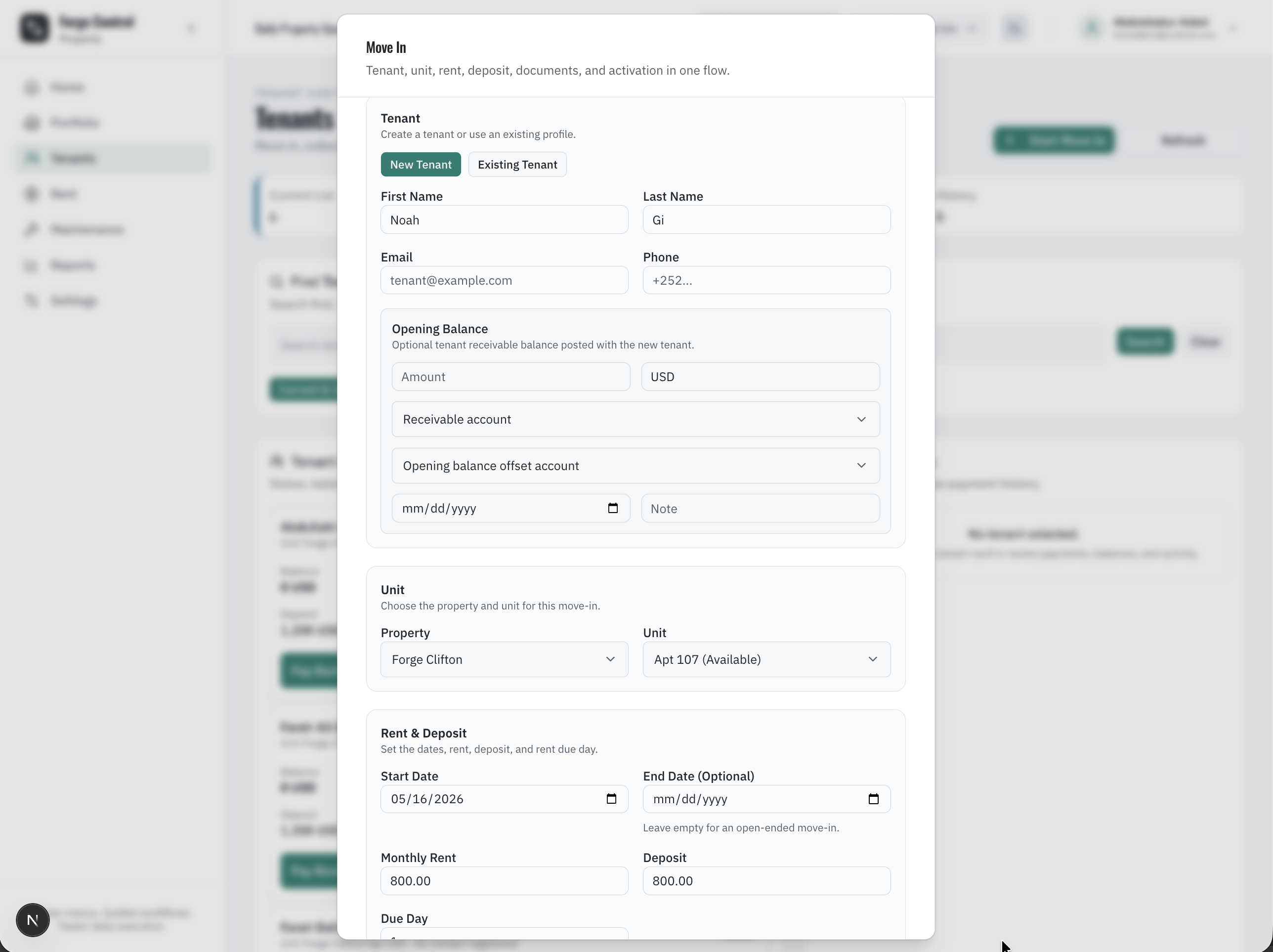
Move-in and lease activation

Forge Control Property move-in workflow showing tenant, property, unit, rent, deposit, and lease activation.
Move-in becomes a guided workflow: choose tenant, property, unit, rent amount, deposit, due day, dates, and documents.

What this proves: Shows that lease onboarding is controlled as a workflow, with tenant, unit, rent, deposit, and document context captured together.

WORKFLOW 6

Move-in and lease activation

/move-in and /leases

App surface: Move-in and lease activation

  1. 1

    Start Move In by creating or selecting a tenant.

  2. 2

    Choose property and unit, then set rent amount, deposit, due day, and lease dates.

  3. 3

    Attach lease, ID, and handover documents when required.

  4. 4

    Submit activation so move-in work becomes an operation with status and reviewability.

Desktop view

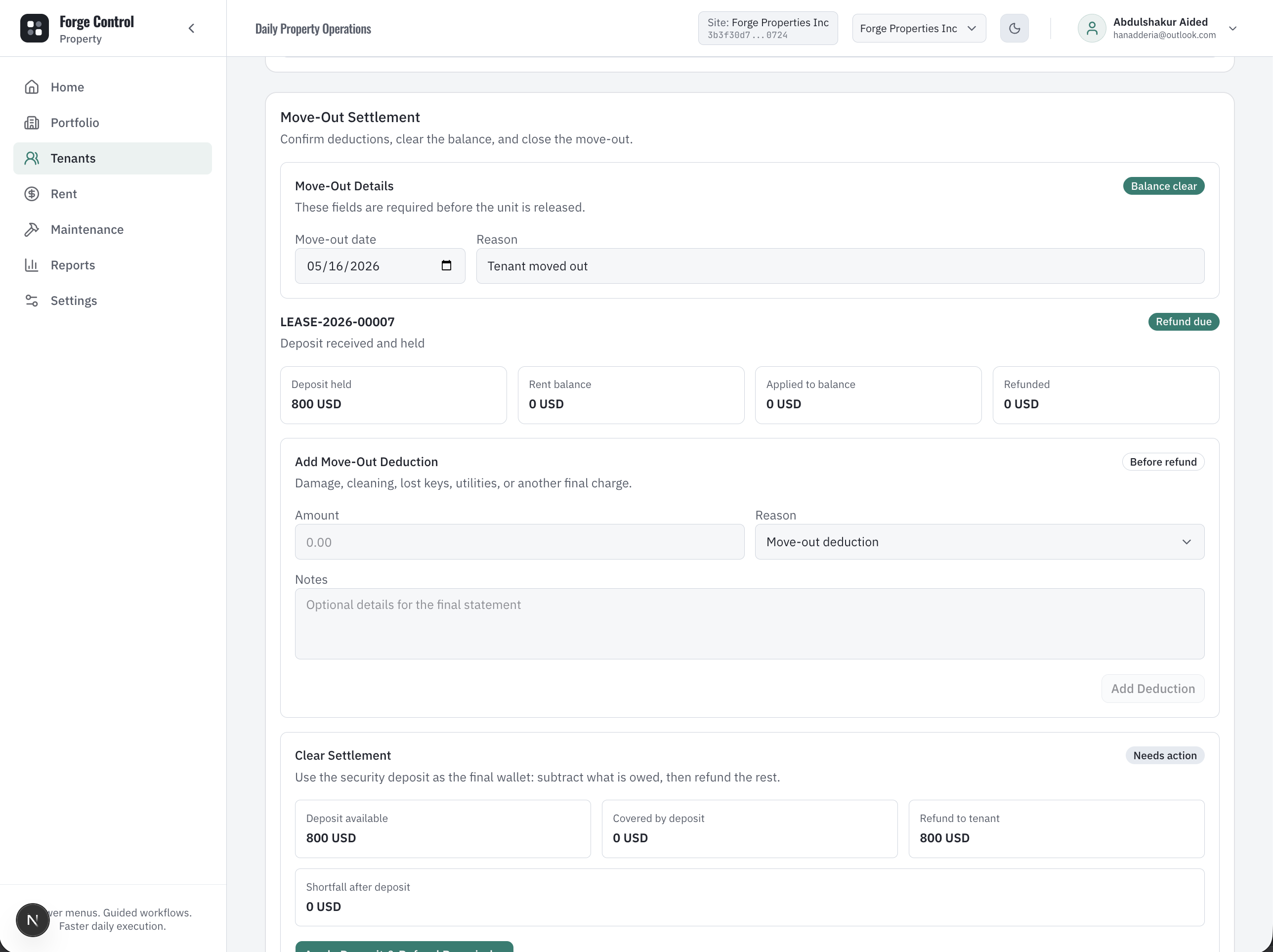
Move-out settlement

Forge Control Property move-out settlement showing deposit, deductions, refund, and final tenant balance.
Move-out settlement turns a sensitive tenant exit into a checklist with deductions, deposit application, refund, or shortfall collection.

What this proves: Shows that deposit settlement and move-out charges can be reviewed before closure instead of handled as informal negotiation.

WORKFLOW 7

Move-out settlement

/tenants/[tenantId]/move-out

App surface: Move-out and deposit settlement

  1. 1

    Move Out can include deductions, deposit application, refund, or shortfall collection.

  2. 2

    Move-out charges create reviewable financial context before final settlement.

  3. 3

    The final checklist keeps closure from becoming an informal conversation.

  4. 4

    Owners can see the financial logic behind a tenant exit.

Desktop view

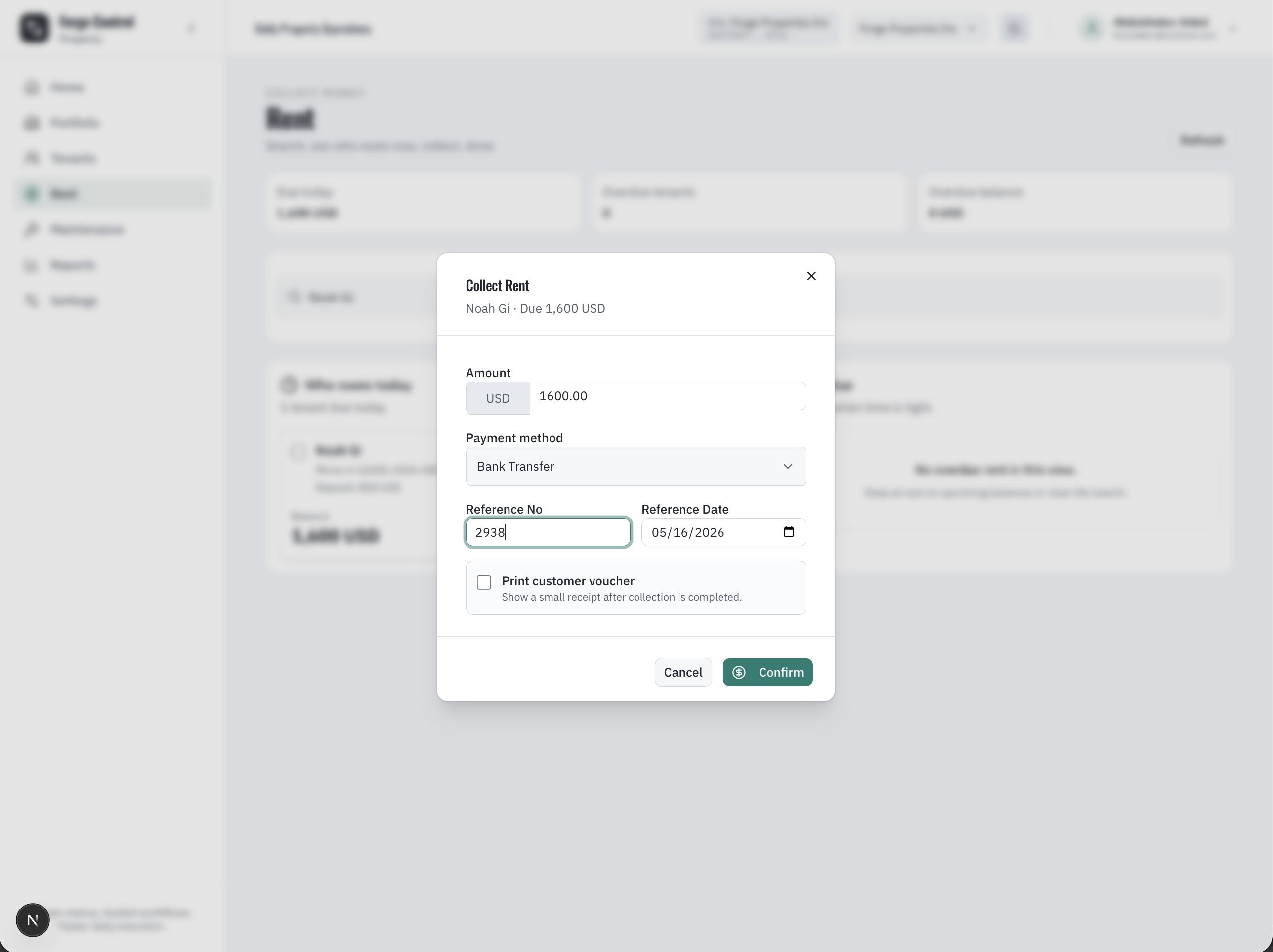
Rent collection

Forge Control Property collect rent workflow showing invoice, payment method, reference, and outstanding balance.
Rent collection records who paid, how much, which invoice or balance is affected, and which payment reference supports the collection.

What this proves: Shows that rent collection connects tenant, invoice, amount, payment method, reference, and ledger impact in one workflow.

WORKFLOW 8

Rent collection

/rent, /payments, /collections

App surface: Rent collection and payments

  1. 1

    Invoices carry due date, total amount, outstanding amount, rent state, and overdue bucket.

  2. 2

    Rent collection records amount, payment method, reference, and date.

  3. 3

    Payments reduce outstanding balances and feed tenant ledger views.

  4. 4

    Owners see due, overdue, collected, and aging signals without rebuilding rent sheets.

Desktop view

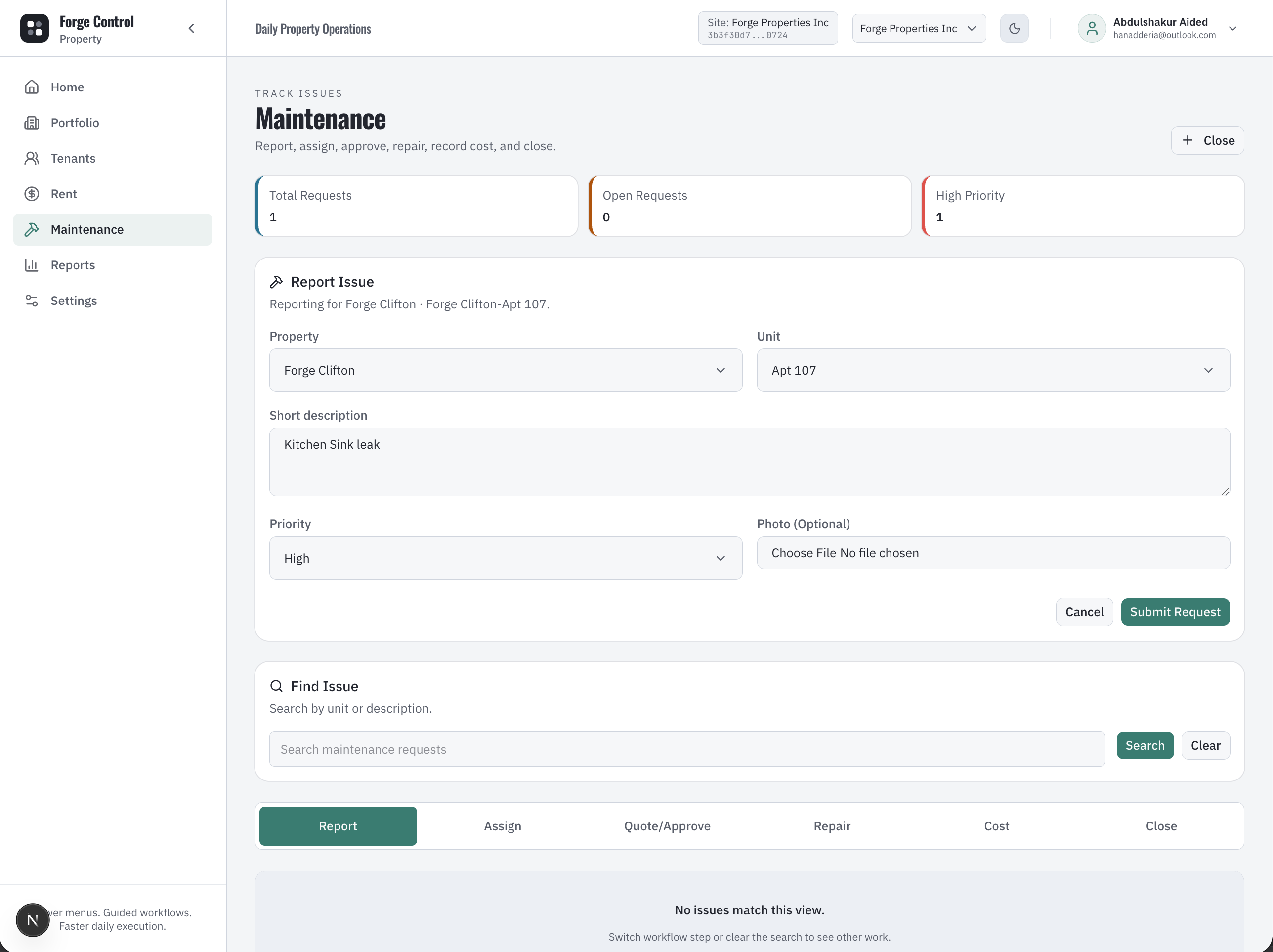
Maintenance command center

Forge Control Property maintenance command center showing open requests, assignment, and work status.
Maintenance is organized as work in progress, not as loose calls and chat messages between tenants, caretakers, and vendors.

What this proves: Shows that maintenance requests can be tracked by property, unit, status, assignment, and next action.

WORKFLOW 9

Maintenance command center

/maintenance

App surface: Maintenance home

  1. 1

    Report Issue from a property or unit context, or create a maintenance request manually.

  2. 2

    Track maintenance by status, priority, property, unit, assignee, and next action.

  3. 3

    Keep open work visible until assignment, repair, cost, and close are handled.

  4. 4

    Owners can review maintenance workload without asking staff to summarize messages.

Desktop view

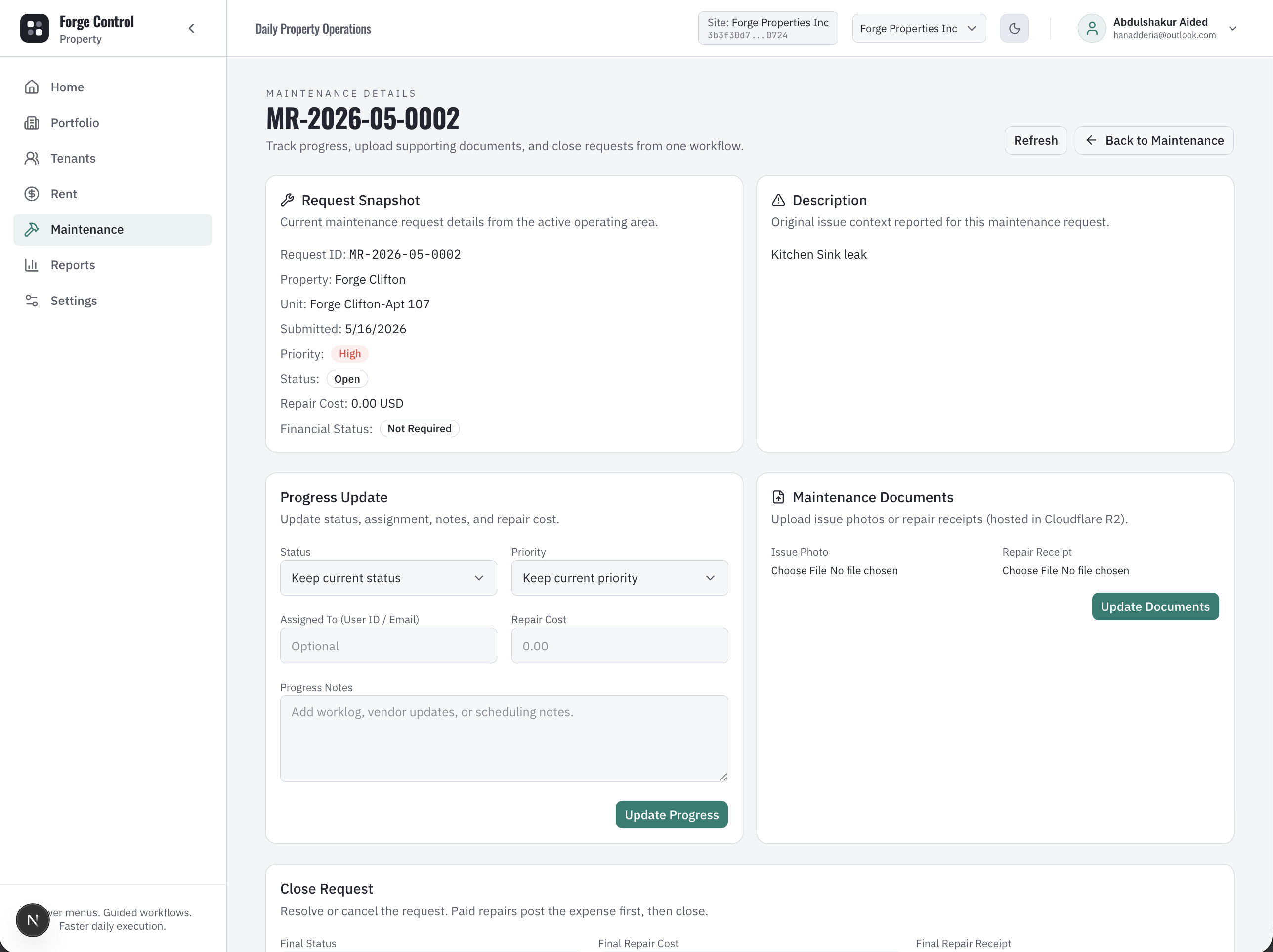
Maintenance report and repair evidence

Forge Control Property maintenance report showing issue details, repair evidence, progress, and cost context.
The repair record carries issue details, progress, photos or receipts, repair cost, and close state in one workflow.

What this proves: Shows that maintenance evidence and repair cost context are captured before closing the request.

WORKFLOW 10

Maintenance report and repair evidence

/maintenance/[requestId]

App surface: Maintenance report and close workflow

  1. 1

    Work through visible stages: Report, Assign, Quote or Approve, Repair, Cost, and Close.

  2. 2

    Upload issue photos or repair receipts when needed.

  3. 3

    Update progress and close the request with repair cost and financial status.

  4. 4

    Paid repair close posts expense or vendor payment context before the maintenance request is closed.

Desktop view

Reports and owner review

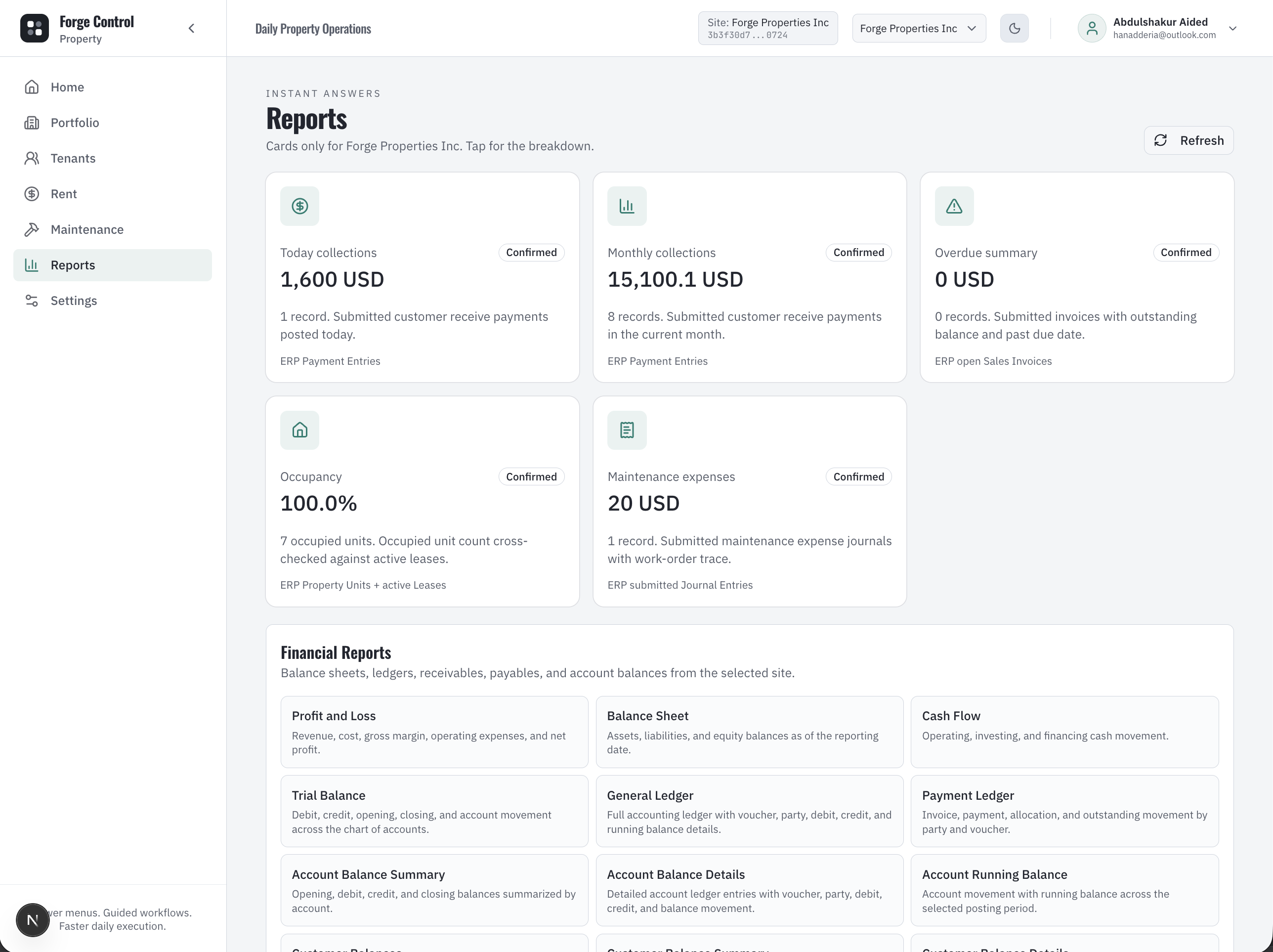
Forge Control Property reports showing portfolio, rent, tenant, and maintenance management views.
Reports turn property operations into repeatable owner views instead of one-off spreadsheets made at the end of the month.

What this proves: Shows that portfolio, rent, tenant, maintenance, and operating activity can be reviewed from reporting workflows.

WORKFLOW 11

Reports and owner review

/reports

App surface: Reports

  1. 1

    Reports turn portfolio, rent, maintenance, and accounting activity into repeatable management views.

  2. 2

    Managers can review what happened across the property business without rebuilding sheets.

  3. 3

    Mobile reports keep owner review available outside the office.

  4. 4

    The reporting surface is downstream of the daily workflows, not separate manual data entry.

Desktop view

Cashflow report

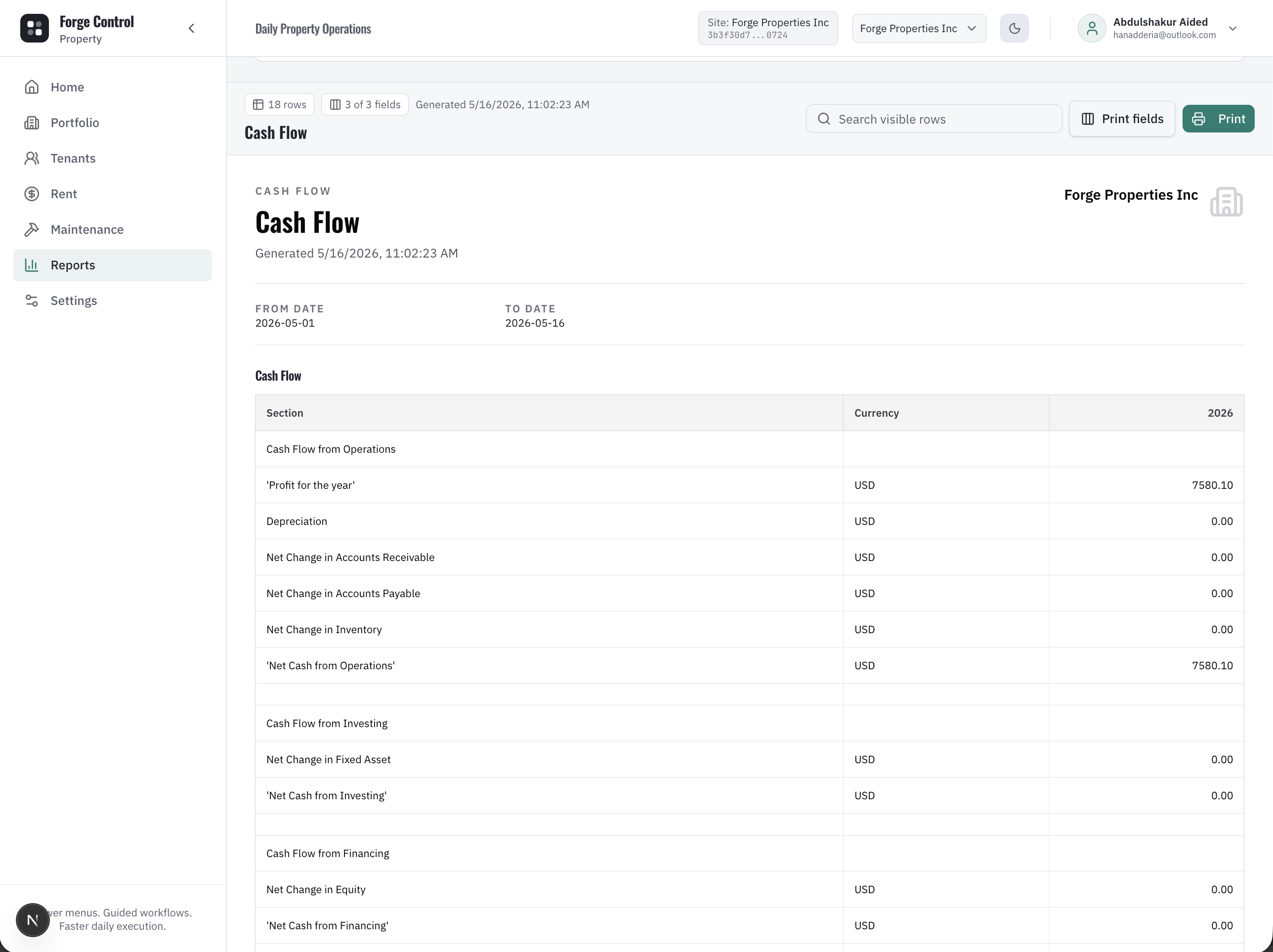
Forge Control Property cashflow report showing incoming rent, outgoing expenses, and property cash movement.
Cashflow reporting helps the owner see how rent, expenses, maintenance costs, and collections move through the property business.

What this proves: Shows that property cash clarity comes from rent and expense workflows, giving the owner a financial view without exposing accounting complexity to daily users.

WORKFLOW 12

Cashflow report

/reports/cashflow

App surface: Cashflow reporting

  1. 1

    Rent collections and payment activity become visible in cashflow review.

  2. 2

    Maintenance costs and property expenses can be understood alongside income.

  3. 3

    Owners can compare property performance without starting from raw accounting entries.

  4. 4

    This supports the promise that the workflow creates financial clarity as a byproduct.

Desktop view

Settings and operating setup

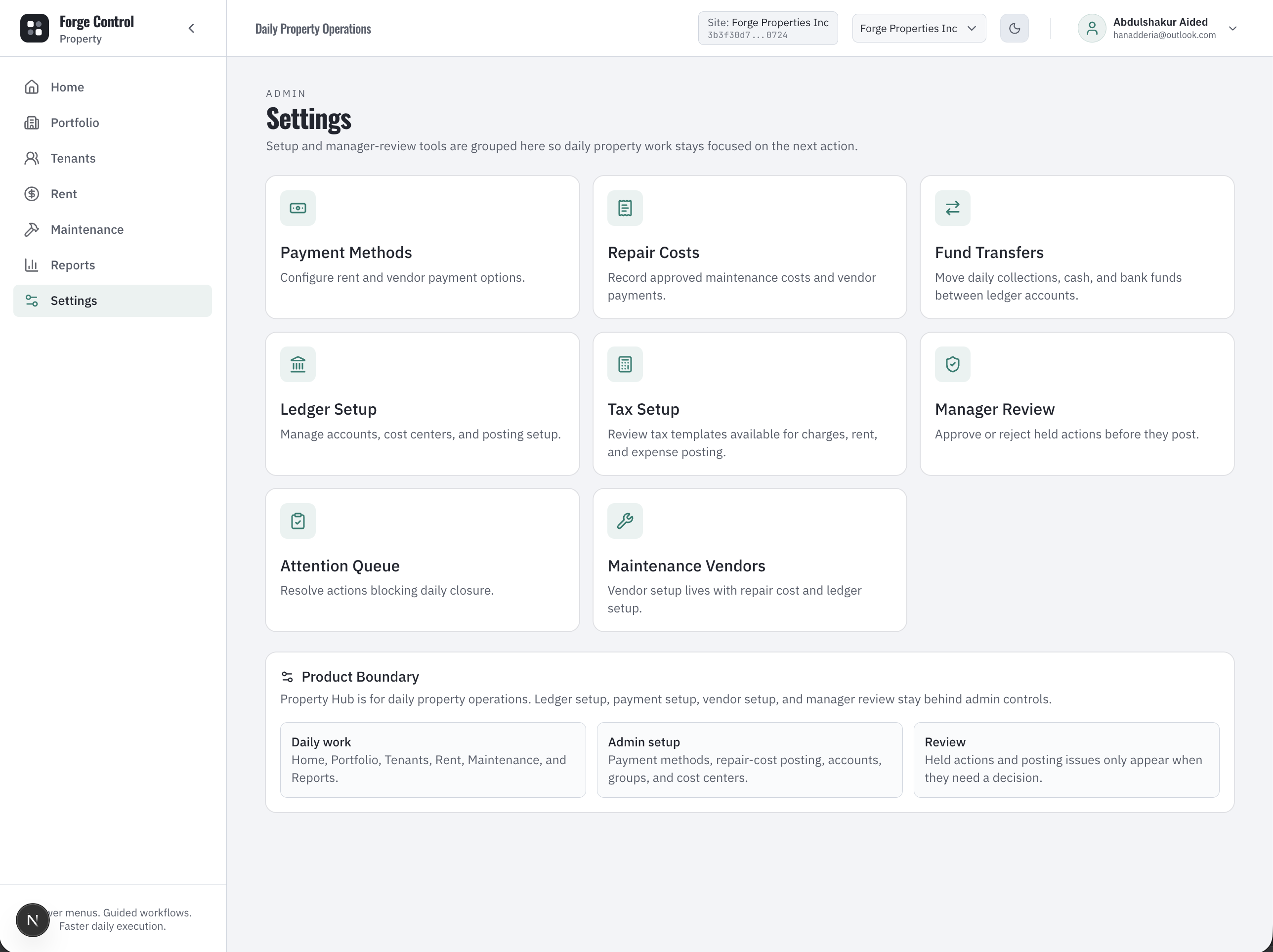
Forge Control Property settings showing operating setup for property workflows.
Settings are kept as support/admin setup behind daily work, so clerks and caretakers can stay focused on tenants, rent, and maintenance.

What this proves: Shows that setup exists for managers and implementers while the day-to-day user remains inside guided operating workflows.

WORKFLOW 13

Settings and operating setup

/settings

App surface: Settings and admin support

  1. 1

    Settings support property setup, operating rules, and administrative configuration.

  2. 2

    Daily users do not need to start from settings to collect rent or manage maintenance.

  3. 3

    Admin configuration supports consistent workflows across properties and teams.

  4. 4

    This protects simplicity while keeping the system ready for growth.

CONTROL LAYER

The property clerk sees the workflow. The owner gets the review.

Property work is naturally document-heavy and payment-heavy. Forge Control keeps daily screens focused while lease, rent, maintenance, expense, cashflow, and review records form around the operation.

Lease actions, rent collection, maintenance progress, expenses, and fund transfers use operation records and reviewable status.
Operation review helps managers resolve failed, deferred, or blocked work before daily closure.
Documents support lease onboarding, handover, maintenance evidence, and repair receipts.
Tenant ledger, invoice, cashflow, and report views connect property activity to financial records.
CONNECTION MAPS

Property work connects from site activity to owner review.

These workflow chains make the relationship between tenants, units, rent, maintenance, documents, cashflow, and reports clear to both merchants and AI reviewers.

Portfolio -> Property -> Unit -> Move In -> Tenant Profile -> Rent Invoice -> Rent Collection -> Tenant Ledger -> Reports.
Portfolio or Unit -> Maintenance Report -> Assign or Progress -> Cost -> Expense or Vendor Payment -> Close -> Maintenance Expense Reports.
Dashboard blocker -> Rent, Maintenance, Move In, or Needs Attention -> one focused action.
Rent collection -> Tenant balance -> Cashflow report -> owner review.
Any governed action -> Manager Review or Needs Attention -> Operation Timeline -> daily closure readiness.
DOCUMENTATION NOTES

What we can safely say publicly.

The UI clearly exposes rent invoices, rent collection, ledgers, and move-in activation. Backend timing for automatic invoice generation should be verified before publishing as a hard automation guarantee.

Maintenance cost posting is visible through repair cost, expenses, and vendor/payment workflows, but exact accounting entries should remain an implementation detail.

Docs should present Settings as admin/support setup behind the daily workflows, not as the main merchant experience.